Gridwright
A pixel font is a typeface drawn on a grid, so every letter is made of whole pixels. In a pixel art game it keeps text in the same style as the sprites. The catch is that pixel fonts only look sharp at their native size or exact multiples of it, so the choice of font and the way you render it matter as much as the style.
Pick a font for each job
- Dialogue and menus: a text font with real lowercase, readable over several lines.
- HUD numbers and small labels: a tiny font, often capitals only, that fits in a status bar.
- Tables, timers and scores: a monospaced font, so digits do not shift as values change.
- Titles: a chunky display font, often with an outline or shadow layer.
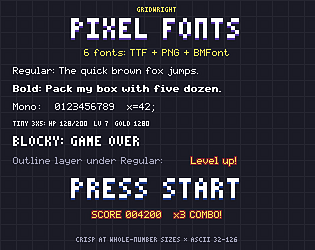
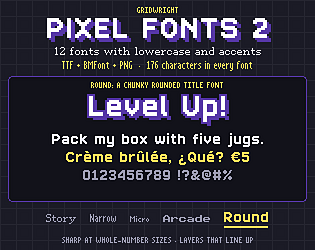
Gridwright’s first font pack covers these roles in one family: a 5x7 text font with Bold, Mono and Outline versions, a 3x5 Tiny font for HUD numbers and a Blocky title font. The second pack adds a serif for dialogue, a condensed font for long lines, a Micro HUD font with lowercase, a monospaced Arcade font and a rounded title font.
Know the native size
Each pixel font has a native pixel size. Gridwright 5x7, for example, is set at 9 px. Use exactly that size, or 2x, 3x and so on. A size in between forces the renderer to blend pixels and the letters turn soft or uneven. If your game renders at a low resolution and scales up, set the font at native size in that low-resolution view.
TTF or bitmap font?
Both Gridwright packs include TrueType files and bitmap fonts (a PNG sheet plus a BMFont .fnt file). TTF is the simplest option in most engines and editors. Bitmap fonts guarantee exact pixels because the engine just copies letters from the image, which is useful if your engine smooths TTF text. Use whichever your engine handles cleanly, and test both at your camera scale.
Keep text crisp
- Turn off anti-aliasing or font smoothing for pixel fonts in your engine’s import or font settings.
- Use nearest-neighbour filtering for bitmap font textures.
- Position text on whole pixels; half-pixel positions cause blur.
- For an outline, draw the matching outline layer under the regular text in a darker colour.
Check the characters you need
Before choosing, list every character your game shows, including accents for translated text. The first Gridwright pack has the 95 printable ASCII characters; the second has 176 characters including Western European accents. Neither replaces a font for languages with other scripts.
Licence
Both packs allow you to use and embed the fonts in commercial games. You may not resell the font files. Download the free sample from itch.io and test it in your engine before buying.