What's in the pack
A pixel art GUI for Ren'Py visual novels, ready to drop in: every screen of Ren'Py's standard GUI in 4 themes, for 1920x1080 and 1280x720 projects. Copy one folder into your game and launch; your screens.rpy stays as it is.
Licence in one line: use it in any personal or commercial game; do not resell the assets.
Four themes, each more than a recolour
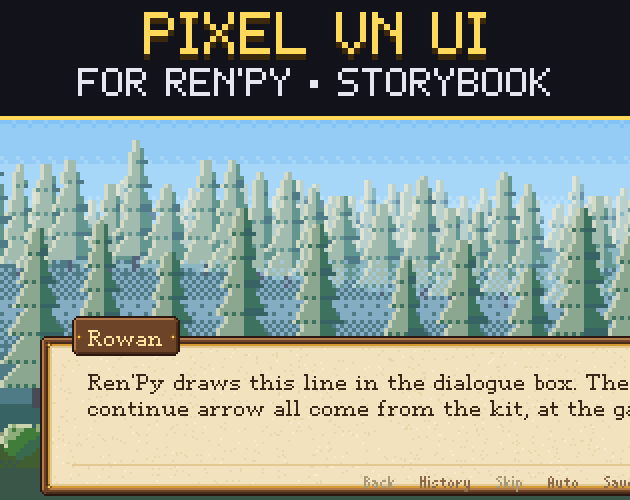
- Storybook: parchment and carved wood with gold studs: fantasy, fairy tales, cozy adventure.
- Neon: dark glass, cyan light and magenta corner ticks: sci-fi, cyberpunk, mystery, thriller.
- Sakura: cream and blossom pink, rounded corners, cherry blossoms: romance, school life, slice of life.
- Gothic: dark stone, blood-red trim and thorns: horror, dark fantasy, vampire and mystery stories.
Every screen
- Dialogue box with name plate and a click-to-continue arrow (4 frames), quick menu inside the box.
- Side-image box: set one line in gui.rpy for a portrait socket;
gw_side()fits a 64x64 pixel portrait into it. - Name plates in 6 colours per theme:
Character("Mia", **gw_namebox("crimson")). - Choices (idle, hover, locked), main menu, game menu, save and load slots, preferences (radio buttons, check boxes, sliders), history, help, about, confirm, skip and notify, and the NVL page.
- Main-menu and game-menu pictures for each theme.
Pixel-exact at both sizes
- Everything sits on one 640x360 pixel grid: 3x for 1920x1080, 2x for 1280x720, so no pixel is ever stretched unevenly.
- Pixel fonts that stay sharp: 5 of our pixel fonts are inside (with accents for Western European languages); every text size is a whole multiple of its font, smoothing off.
- gui.rpy is the file Ren'Py's own launcher writes, with our values put in, and the extras are one small file (
gridwright_gui.rpy) that only adds style properties. Nothing in screens.rpy is replaced.
Tested in Ren'Py 8.5.3
For every theme at both sizes the build drops the files into a fresh project made by Ren'Py's launcher, runs Ren'Py's lint (no errors) and has Ren'Py render every screen at the game's own size. The screenshots on this page are those renders. The backgrounds and the portrait inside the dialogue screenshots are from our Parallax Backgrounds and Pixel Portraits packs (sold separately); the main-menu pictures are included.
Not using Ren'Py?
Every piece is also a PNG at 1x, 2x, 3x and 4x with pieces.json (size, 9-slice insets, text padding) for Godot (Dialogic), Unity, GameMaker or your own engine. A small runnable demo project per theme is included too.
What it does not include
No character sprites, portraits or story backgrounds (only the main-menu pictures), no PSD files, no gallery or music-room screens (they are not part of Ren'Py's standard GUI), no separate phone layout (phones use the same one; not tested on a phone).
Licence
Use and modify it in personal and commercial games and ship it inside your game. Do not resell or redistribute the assets themselves. Credit is appreciated, not required. Not for AI training or NFTs. gui.rpy, screens.rpy and options.rpy are Ren'Py files under Ren'Py's MIT licence.
How it was made
Every piece is drawn by code (Python) on the pixel grid; the main-menu pictures are scenes from our code-drawn Parallax Backgrounds, and the fonts are from our Pixel Fonts 2. No image generator, no third-party art. The code was written with AI-assisted tools, which is why the page is tagged AI Assisted.