 Gridwright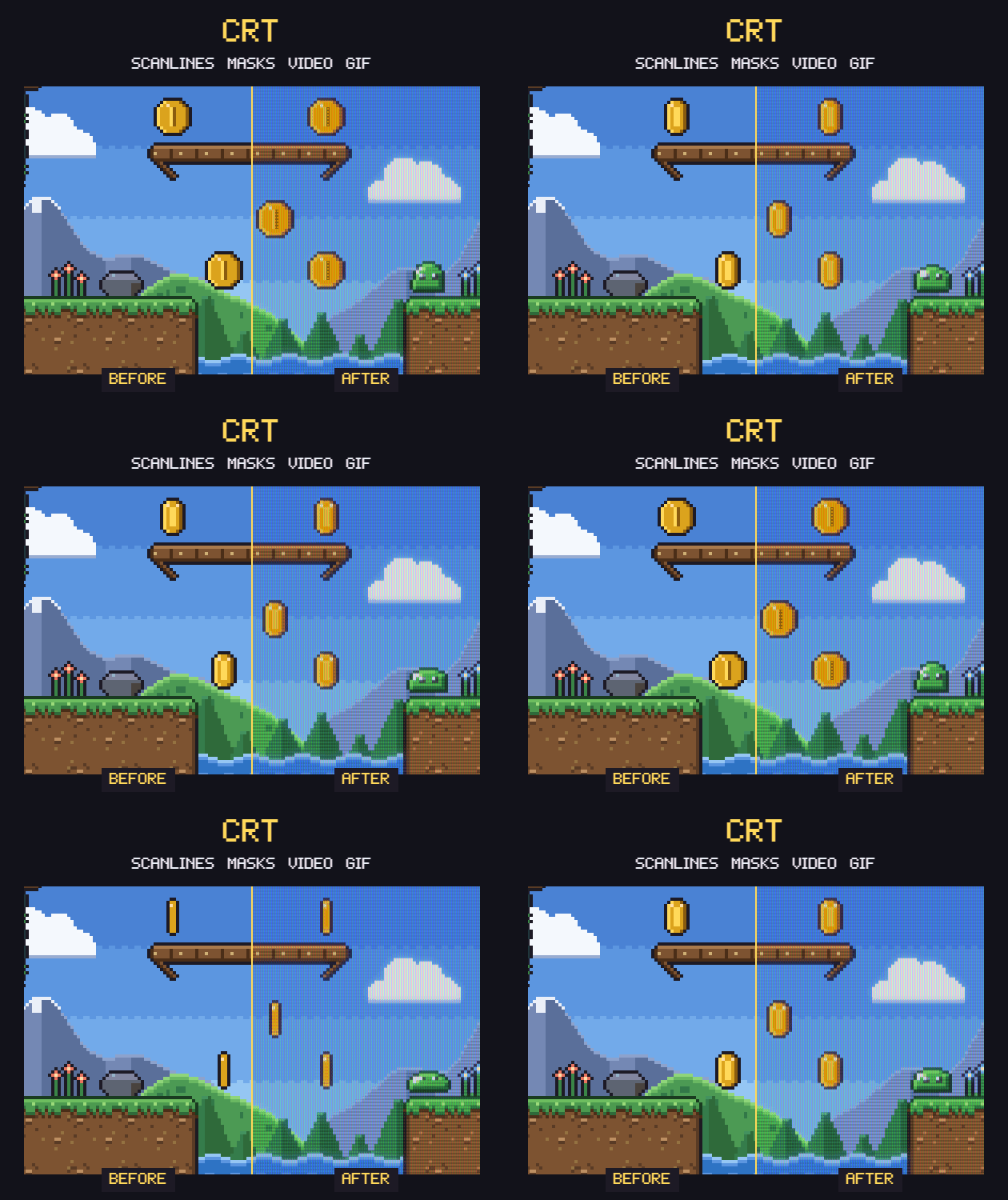
CRT
Retro CRT Filter for Pixel Art (scanlines, masks, video & GIF export)
Show pixel art on a simulated CRT or handheld LCD. Save PNG, video or GIF at any size. No install.
$4.99or more
- Status
- Released
- Category
- Tool
- Platforms
- Windows, macOS, Linux
- Author
- Gridwright
- Tags
- 16-bit2D8-BitAsepriteEffectsPixel ArtRetroRoyalty FreeShadersvideo
- AI Disclosure
- AI Assisted, Code, Graphics
About this pack
Put your pixel art on a real-looking old screen and save it as PNG, video or GIF: scanlines, phosphor masks, curved glass, glow, composite and RF signal, or a handheld LCD. Any size, no install: it opens in your browser.
Licence in one line: use the images and videos you make anywhere, commercial too.
The look
- 7 presets: studio monitor, arcade cabinet, home TV (composite), old TV (RF aerial), PC monitor (VGA), handheld LCD, scanlines only. Then tune everything.
- Scanlines where bright lines grow thicker, like a real electron beam.
- Phosphor masks: aperture grille, slot mask, shadow mask or LCD grid, drawn so the pattern stays visible on bright areas.
- Signal: clean RGB, composite colour bleed and ghosting, RF noise and jitter.
- Curvature, round corners, dark edges, glow, flicker, a rolling bar and afterglow trails.
Any size, any input
- Images, GIFs, image sequences and videos (MP4, WebM).
- Finds the real pixel size of an enlarged screenshot or GIF by itself, so the scanlines line up with your pixels.
- Output from 2x to 8x your art, up to 4096 pixels wide. No 480-line limit.
- Transparent outside the screen for overlays and thumbnails, black, or a plastic frame.
- Before / after slider, zoom to 1x to check the mask pixel by pixel.
Save
- PNG of any frame at full size.
- Video: MP4 where your browser can make it (Chrome and Edge on most computers), otherwise WebM. Recorded in real time.
- GIF frame by frame, for Discord, devlogs and store pages.
- Presets: save your look to a file and share it with your team.
Runs everywhere, private
One HTML file: double-click it and it opens in your browser on Windows, macOS, Linux or a Chromebook. No install, no account, no drivers. Your files never leave your computer. Tested in Chrome and Edge on Windows (screen effect, all presets, PNG, GIF, MP4 and WebM).
Try before you buy
The free demo has every effect and saves PNGs up to 640 pixels wide. The full version saves any size, video and GIF.
How it was made
The code, including the WebGL screen shader, was written with the help of an AI coding assistant and tested by us with automated checks. The sample level is our own code-drawn pixel art from the Gridwright Platformer Tileset.
Want another screen type? Leave a comment: the tool gets updates.
Guides for this pack
More tools
Isometric Builder
$14.99Isometric pixel art map builder: 440 pieces from 7 packs, real heights, night, Godot + Tiled export
Pixelator
$4.99Turn renders, paintings and photos into clean pixel art: exact grid, palettes, dithering, outlines.
Normal Maps
$4.99Normal, height, specular and AO maps for 2D sprites and pixel art, with a live lighting preview.