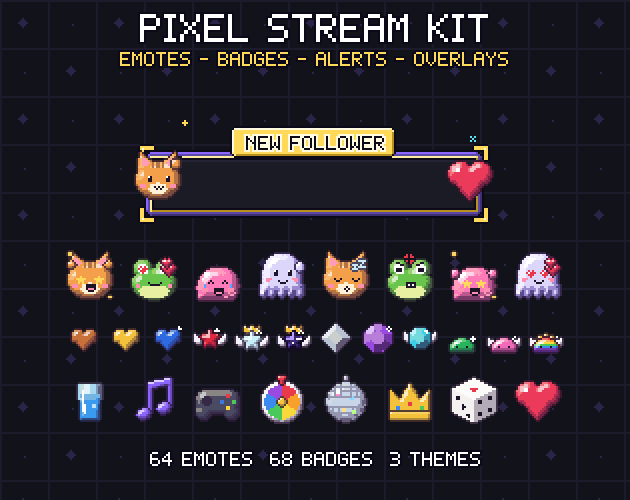
Many indie developers stream their work: devlogs, playtests, jam weekends, the launch day of a demo. A pixel art game deserves a channel that looks like it, and pixel art is a natural fit for the tiny images a stream needs. Emotes and badges are shown at a few dozen pixels, exactly the scale pixel art was invented for.
Pixel art also breaks easily. Upload one big image and let the platform shrink it, and the crisp edges turn into mush. This guide explains which sizes Twitch asks for, why pixel art should be drawn at the smallest one, how to keep a face readable at 28 pixels, and how to carry the same style into alerts, screens and overlays. The examples come from Gridwright Pixel Stream Kit, but the rules work for any art.
The sizes Twitch asks for
Twitch's creator dashboard asks for emotes in three sizes and for subscriber and bit badges in three smaller ones. Channel point reward icons use the emote sizes. Discord's custom emoji are usually made at 128 pixels.
- Emotes: 28, 56 and 112 pixels square.
- Subscriber and bit badges: 18, 36 and 72 pixels square.
- Channel point icons: 28, 56 and 112 pixels.
- Discord emoji: 128 pixels is the usual upload.
Twitch can also take one large emote and resize it for you. For pixel art, skip that option and upload all three sizes yourself. Platform rules change from time to time, so check the upload page on the day you upload and keep the files small.
Draw at the smallest size, scale by whole numbers
The trick that keeps pixel art sharp is simple: draw each emote at 28 pixels and each badge at 18, the smallest sizes viewers see. The bigger files are the same pixels repeated: 56 is exactly 2x and 112 is exactly 4x for emotes, 36 is 2x and 72 is 4x for badges. Nothing is resampled, so nothing blurs.
The opposite approach, drawing at 112 and shrinking to 28, fails twice. The shrink averages pixels into soft colours, and details that looked fine at 112, like thin outlines or a highlight in the eye, simply disappear. If you already have big art, redraw the small sizes by hand instead of trusting a resize.
Discord is the odd one out at 128, which is not a whole-number scale of 28. Centre the 112 pixel version on a 128 pixel transparent canvas: the art stays sharp and gets a little breathing room.
Faces that read at 28 pixels
An emote is mostly a face, and at 28 pixels a face has very few pixels to spend. The same rules that make pixel art icons readable apply, only harder.
- Keep a 1 pixel dark outline round the whole emote, so it reads on Twitch's light and dark chat themes.
- Make the head fill most of the canvas: 22 to 24 pixels of head in a 28 pixel emote.
- Draw eyes as tiny typed shapes, 2 or 3 pixels wide, not as circles: a dot with one white glint, a caret for laughing, two lines for sleeping.
- Change one or two features per expression. Love swaps the eyes for hearts; rage adds slanted brows and gritted teeth.
- Put props like hearts, sweat drops and question marks in the free corner above one eye, and give them their own outline.
- Leave a pixel of space round the edge, so nothing gets cut when the emote is animated.
A small cast goes a long way. Four mascots with the same 14 expressions give a channel 56 emotes that clearly belong together, and viewers learn the faces quickly. Word emotes such as GG, LOL or BRB help too, as long as the letters are thick: 2 pixel strokes read at 28 pixels, 1 pixel strokes do not.
Badges that show loyalty at 18 pixels
Subscriber badges sit next to a viewer's name, so they need to say one thing: how long that viewer has stayed. At 18 pixels a badge cannot carry detail, but it can carry a clear ladder.
- Keep one shape for the whole set: a heart, a star, a gem or a mascot.
- Climb through materials everyone already ranks: copper, silver, gold, then gems.
- Add one ornament at milestones: a glint, then wings, then a crown.
- Test every tier next to the others at 1x on a dark and a light background.
Bit badges follow the same idea with a different ladder. A cluster that grows from one crystal to five, or a potion that fills up, reads instantly even when the badge is tiny.
Animated emotes without the noise
Animated emotes are GIFs, and a GIF that changes every pixel every frame is both distracting and heavy. Pixel art animates well with very little motion: a 1 pixel bob, a paw that waves between two positions, a heart that floats up, a Z that rises. Four to eight frames are enough for most loops.
Make every frame different and check the loop by watching it at 28 pixels, the size viewers see. Movement must stay inside the canvas, which is why the 1 pixel margin matters. Keep a static version of every animated emote too, for places that only take PNG files.
Alerts, screens and overlays at 1080p
A stream is usually 1920x1080. Pixel art for overlays works best at one scale: draw at 480x270 and scale by exactly 4, so every frame, panel and title shares the same pixel size. Mixing scales, such as a 2x frame next to a 4x mascot, is the fastest way to make an overlay look cheap.
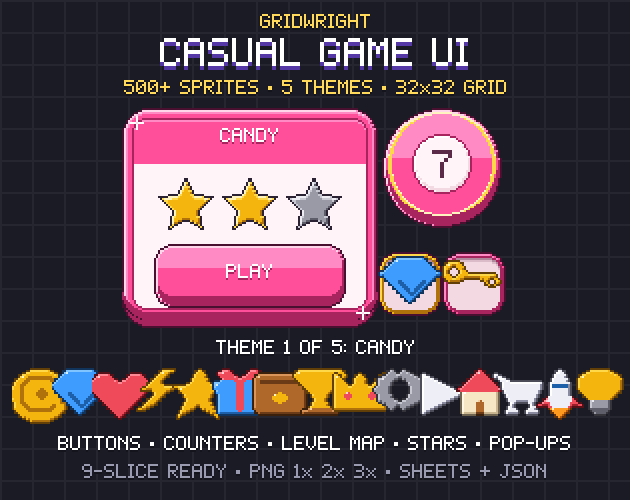
Frames, chat boxes and panels are the same problem as 9-slice UI in a game: corners stay fixed and the edges stretch, so keep ornaments in the corners. Alerts need an empty area where your alert service writes the viewer's name. Export them as WebM with transparency for OBS, plus a GIF for services that only accept GIFs. If you are already making a game UI, a chunky style like Casual Game UI shows how the same frames can carry over.
- Starting soon, be right back, ending and offline screens as seamless loops.
- Webcam and chat frames with an exact hole size, for example 640x360 for a 16:9 camera at 4x.
- A stinger transition that fully covers the screen at a known moment, so the scene switch hides behind it.
- Short alert sounds that match the art: 8-bit and 16-bit jingles fit pixel art, see Retro Sound Effects.
A checklist before you upload
- Every emote exists at 28, 56 and 112, and the bigger files are whole-number scales of the 28 pixel art.
- Every badge exists at 18, 36 and 72, and every tier is different at 1x.
- Animated emotes loop without a jump and stay inside the canvas.
- Overlays share one pixel scale and line up with your 1080p scene.
- File names say what each file is, so you can find the 6 month badge in a hurry.
Premade emotes and overlays save weeks, but check the licence: streaming and using them as your own channel's emotes should be allowed, reselling them as premade assets usually is not. Gridwright packs can be used in commercial games; you may not resell the files themselves. Packs released from October 28, 2026 ask for a credit: “Art by Gridwright” with a link (each pack’s LICENSE.txt says which applies).