Gridwright
A Halloween level is one of the cheapest ways to give players a reason to come back. It can be a limited event in a live game, a bonus stage, a seasonal skin for an existing map, or a whole jam game made in a weekend. What makes it work is not one big feature but a handful of details that all say the same thing: graves and fog, light from candles and jack-o'-lanterns, enemies that crawl out of the ground, and a UI that matches the mood.
This guide lists those pieces, how to put them together, and where Gridwright packs can save you time. The examples are isometric, with notes for top-down games along the way.
Pick one setting and commit to it
Spooky levels fail when they mix everything at once: a graveyard, a haunted mansion, a witch's swamp and a crypt in one small map. Pick one setting and let it fill the screen. Three settings that are easy to read at small pixel sizes:
- A graveyard at night: rows of tombstones, an iron fence, a chapel or a mausoleum, ground mist.
- A crypt below it: stone walls, coffins and sarcophagi, candles, bones, an iron gate.
- A haunted village: an ordinary map you already have, re-lit for night with pumpkins on the doorsteps and fog in the streets.
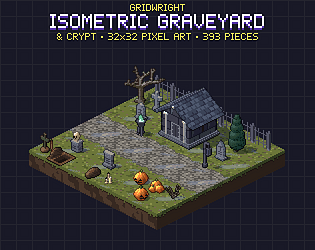
The last one is the fastest: you reuse a finished level and only add a seasonal layer. If your game is isometric, Gridwright Isometric Graveyard & Crypt covers the first two settings on the same grid as our other isometric packs, so a graveyard can sit next to the village from Isometric Tiles.
The ground sets the mood
Players read the ground before anything else. Swap bright grass for dead or dark grass, add grave dirt, gravel paths and mossy flagstones, and the map already feels different. Ground mist does the rest. Mist has to repeat across the whole map without a visible seam and loop without a jump, or the eye catches the pattern. The graveyard pack's thin and thick mist is one seamless field drawn over a 2x2 block of tiles and looping in 8 frames, so it never shows a grid. For a top-down game, the fog overlays in Weather FX tile across the screen and loop the same way.
Tombstones: variety beats quantity
A graveyard with one tombstone copied fifty times looks like wallpaper. Mix shapes and ages: crosses, rounded slabs, obelisks, broken stones, a few fresh graves with turned earth and an open grave with a shovel. The graveyard pack has 26 tombstones from 14 designs, most of them in both facings, plus 8 graves. Place them in loose rows, not a perfect grid, and leave paths between them where the player walks.
Light is what makes it spooky
Darkness alone is not scary; it is just hard to see. What sells a night scene is a few warm lights in a cold, dark world. Use jack-o'-lanterns, candles, lanterns and braziers as islands of orange light, and keep everything else blue and desaturated. In the graveyard pack every light source comes lit and unlit, and the flames are animated, so you can light the path as the player walks it or blow out the candles when a monster appears. A ghost-green brazier or a glowing wisp makes a good marker for something supernatural.
To turn any day map into night, darken every colour except the light colours and add a soft glow around the lights. The Isometric Builder does this with one Night switch, which is a quick way to check whether your level still reads in the dark.
Monsters that arrive with style
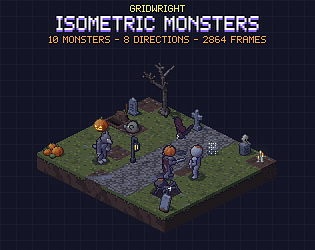
The moment a monster appears is the scariest moment it has. A zombie that pops into existence is a bug; a zombie that claws its way out of a grave is a scene. Gridwright Isometric Monsters gives each of its 10 monsters a spawn animation: the zombie climbs out of its grave, the ghost fades in, the pumpkin knight wakes as its face lights up, the imp rises out of flames, the spider drops down on a thread. All of them are drawn in 8 directions, none mirrored, with idle, move, attack, hurt and death animations.
- Spawn enemies where the setting explains them: zombies at graves, spiders under the crypt ceiling, ghosts in the mist.
- Use the spawn animation as a warning: give the player half a second to react before the first attack.
- Mix one slow, tough enemy with a few fast, weak ones. A golem and a swarm of bats play very differently from five identical zombies.
- Save the biggest monster, a werewolf or a pumpkin knight, for the end of the level.
For a top-down game on a 16x16 grid, Gridwright Pixel Monsters has a ghost, a bat, a spider, a wisp and walking skeletons and zombies, and the crypt style of the Dungeon Tileset has coffins, candles and cobwebs.
A UI that matches
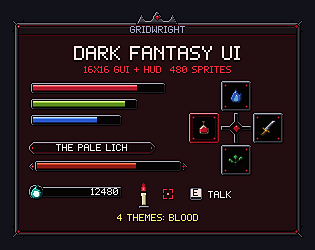
A default blue menu on top of a haunted graveyard breaks the spell. A seasonal UI theme is a small change with a big effect. Gridwright Dark Fantasy UI has four themes with the same layout and file names; its Hallow theme is made for Halloween, with purple wood, pumpkins and vines, so you can swap the folder for October and swap it back afterwards. It also has status meters for curse, poison and bleed, a boss bar with a name plate, and a low-health pulse, all of which suit a horror boss fight.
Sound and effects
Effects tie the scene together: a puff of shadow when a ghost vanishes, poison bubbles from a cauldron, embers drifting past a bonfire. The shadow and poison elements in Spell VFX cover magic attacks and auras, and the embers, ash and fireflies in Weather FX make good ambient particles. Add a low wind loop and a distant bell and the level is ready.
Plan the event, not just the art
- Ship it before Halloween week. Players look for seasonal content in the second half of October.
- Keep the event small: one map, one new enemy type, one reward.
- Reuse your normal level layout where you can, and spend the time on light and mood.
- Test at night settings on a real screen; dark scenes look darker on phones and cheap monitors.
- Keep the seasonal assets in their own folder so the event can come back next year.
In 2026 every Gridwright pack is 40% off in our Halloween sale from 26 October to 2 November, and the packs can be used in commercial games without credit. See can I use game assets in a commercial game for what the licence allows.