What's in the pack
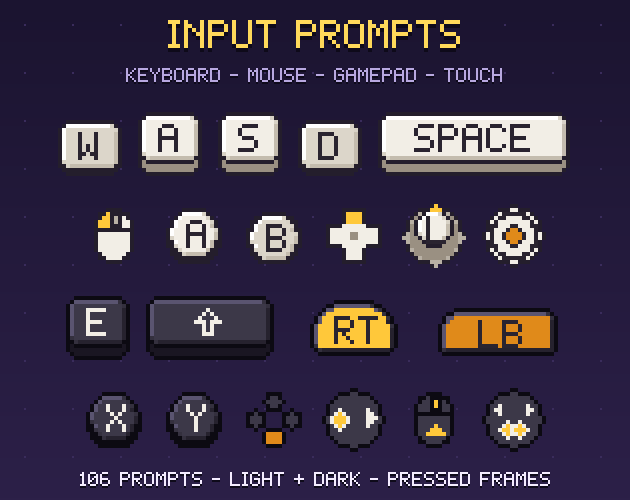
Button prompts for every input, in pixel art: 60 keyboard keys, 6 mouse prompts, 31 gamepad prompts and 9 touch gestures on a 16x16 grid, each in a light and a dark style with a pressed frame. 424 sprites for tutorials, HUD hints, menus and rebinding screens.
Licence in one line: use them in your commercial games; do not resell the files. No credit required.
What you get
- Keyboard (60): A-Z, 0-9, F1-F12, the 4 arrows, Space, Shift, Ctrl, Alt, Tab, Enter, Esc and Backspace as keycaps with a lip; wide keys are 32x16, Space 48x16.
- Mouse (6): left, right and middle click, wheel up, wheel down, move.
- Gamepad (31), generic: face buttons A, B, X, Y in neutral colours, face-button position icons (north, south, east, west) that work for any controller, D-pad directions, left and right sticks with 4 directions, any direction and press, bumpers, triggers, start and select. No console logos or brand symbols.
- Touch (9): tap, double tap, hold, swipe in 4 directions, pinch in and pinch out.
- 2 frames each: normal and pressed (the key sinks, the stick leans, the ring grows): loop them for a "press this" hint.
Made for game code
- prompts.json names every prompt with its frames per style, and gives each key its Godot 4 Key name and Unity KeyCode, so a rebinding screen can look up the icon for the key the player pressed.
- An atlas per style with a JSON map, every frame as its own PNG, at 1x, 2x, 3x and 4x.
- Exact sizes (16x16, 32x16, 48x16); the build checks every sprite and that no two are the same.
What it does not include
No numpad or punctuation keys, no brand-specific controller sets, no font. The labels in the screenshots use our preview font; the tutorial screen is a mock-up made from the pack.
Licence
Use and modify in personal and commercial projects. Shipping the sprites inside your game is fine. No resale or redistribution of the assets, modified or not. Credit is appreciated, not required. Not for AI training or NFTs.
How it was made
Every icon is drawn by code (Python): keycaps built ring by ring with a bevel lit from the top left, letters from our own pixel font, the other shapes set pixel by pixel. No image generator, no third-party art. The drawing code was written with AI-assisted tools, which is why the page is tagged AI Assisted.