Gridwright
Castles are everywhere in games: the base you defend in a tower defense game, the capital of a strategy map, the final dungeon of an RPG, the prize of a siege level. In isometric pixel art they look great, because the view shows walls, towers and courtyards at once. They are also easy to get wrong. Walls have to meet at every corner, towers have to sit on the wall line, tall sprites overlap each other, and one piece drawn in the wrong order breaks the whole picture.
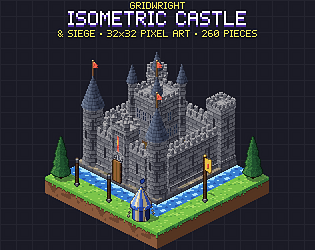
This guide walks through building an isometric castle map step by step, from the grid to the export. The examples use Gridwright Isometric Castle & Siege, but the same steps work with any 2:1 isometric tileset.
1. Start from the grid
Most isometric pixel art uses a 2:1 diamond: each map cell is 32 pixels wide and 16 pixels tall. A full ground block is a 32x32 sprite: the 16-pixel diamond on top plus 16 pixels of side faces. Walls, towers and buildings are taller sprites whose base covers one or more diamonds. Every piece of the castle must share that grid. If one tileset uses a 32x16 diamond and another a 64x32 one, the walls will never meet the ground cleanly.
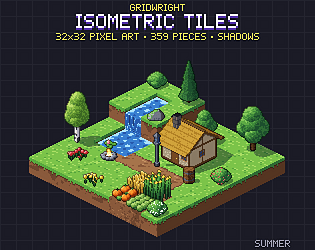
Castle & Siege sits on the same 32x16 diamond as Gridwright Isometric Tiles, so the grass, water, roads and trees around the castle come from that pack and line up exactly. If you are new to the view, read our isometric starter guide first, and see how to choose a tile size if you have not settled on one.
2. Plan the layout before you place a piece
- Mark the wall ring as a set of cells. A rectangle 8 to 10 cells wide is a good first castle: big enough for a keep and a courtyard, small enough to fit one screen.
- Put a tower on every corner and one more on each long wall. Towers break up long straight runs and give archers somewhere to stand.
- Choose the gate side. The walls nearest the camera (the bottom of the screen) show a gatehouse best; a gate on a back wall is hidden behind the keep.
- Leave a ring of cells around the walls for a moat or a ditch, and room in front of the gate for a road, a bridge or a siege camp.
- Decide where units walk. Keep the gate cell and one path through the courtyard free of props.
3. Raise the ground first
Lay the terrain before any wall goes up: grass outside, a paved courtyard inside, water in the moat. If the castle stands on a hill, stack one or two blocks under the whole wall ring. Height reads instantly in isometric, and a castle on raised ground looks defended before a single soldier is placed. Use ramps or stairs for the road up to the gate, and keep slopes away from the walls themselves: a wall standing on a slope needs special pieces that most kits do not have.
Water needs edges. Animated water blocks with foam where they meet land make a moat look finished; a moat without foam looks like a blue floor. Isometric Tiles includes animated water and foam pieces for every side.
4. Walls that join by themselves
Placing corner, straight, T and end pieces by hand is slow and error prone. A wall set with 16 joins covers every case. Each wall cell looks at its four neighbours (north-east, south-east, south-west and north-west) and picks its piece from which of them also hold a wall. Give the neighbours the values 1, 2, 4 and 8 and add them up: 0 is a lone pillar, 5 and 10 are straight runs, 15 is a crossing, and every other number is a corner, an end or a T. That number is the piece's index.
Castle & Siege has the full 16 joins for grey stone, sandstone and dark basalt walls, with battlements on every open side and a wall walk on top, plus a ruined wall and a wooden palisade with the same 16 joins. The finishes share one shape, so a grey castle can have a basalt inner keep wall without a seam. In your engine, wire the joins to an autotiler (Godot's terrain sets or a few lines of code that compute the number above). In the Isometric Builder you simply paint the wall along the cells and the joins are picked for you.
5. Towers and the gatehouse
Towers belong on the wall line, not beside it, so the battlements meet. In this kit a tower or a gatehouse takes the place of a wall cell, and the walls on either side join it. Round towers with conical roofs on the back corners frame the silhouette; square or open-topped towers at the front keep the courtyard visible. Too many roofs near the camera hide what the player needs to see.
The gatehouse is the focal point. The pack's gatehouse has a portcullis that rises and a drawbridge that lowers over the moat as animation frames, which gives you a ready-made moment for a cutscene, a level start or a siege objective: the ram breaks the gate, the bridge comes down, the attackers pour in.
6. Fill the courtyard
- Place the keep, the tallest building, towards the back of the courtyard so it does not hide everything in front of it.
- Line barracks and a stable along the inner walls, where they read as part of the fortress.
- Add the small things that make a castle feel lived in: a well, a forge, weapon racks, training dummies, archery targets, flag poles.
- Keep one cell clear behind the gate and a path to the keep, so units can move and the eye can follow the route.
7. Build a siege camp
A castle on its own is a backdrop; a castle under siege is a level. Put the attacking camp beyond the moat on churned mud: tents in the attacker's colours, barricades, piles of stone ammunition, and the siege engines facing the gate. Castle & Siege includes a catapult that fires in 4 frames, a trebuchet, a ballista, a battering ram, a siege tower and ladders. Soldiers can come from Isometric Characters, drawn in 8 directions on the same grid, so knights, archers and barbarians can face the walls from any side.
8. Get the draw order right
This is where most isometric maps break. Things lower on the screen must be drawn on top of things above them. A simple rule works for most maps: draw cell by cell in order of row plus column, from the back of the map to the front; within a cell draw the ground, then its shadow, then the standing object. A tall tower belongs to the cell it stands on, so it is drawn when that cell's turn comes. Objects bigger than one cell are sorted by their front-most cell.
In Godot 4, put standing objects in a node with Y Sort enabled and give each sprite an offset so its origin sits at the bottom of its footprint; the engine then sorts by that point. In Tiled, put objects in an object layer with the Index draw order and add them from back to front. Shadows are separate sprites in the pack, drawn on the ground before any object, so a tower's shadow never covers the wall next to it.
9. Night, light and animation
A castle at night with lit windows and torches is one of the strongest screenshots you can make. The keep, barracks and forge in the pack have lit versions, and the torch posts burn in animation frames. For a night scene, darken everything except the light colours. The Isometric Builder has a Night switch that does this for the whole map, and its Animate switch plays the flags, torches and the catapult while you build.
10. Export and put it in your game
If you assemble the map by hand in your engine, the pack's JSON tells you each piece's anchor and footprint. If you build it in the Isometric Builder, export the finished map as a PNG at 1x or 2x, an animated GIF, a JSON list of every placed sprite in draw order, a Tiled map or a Godot scene with every sprite already placed and sorted. The builder runs offline in your browser and its free demo lets you try the workflow first.
Castle checklist
- One grid for every piece: ground, walls, towers, props and characters.
- Walls on flat ground, joined by neighbour bits, with towers on the wall line.
- The gate on a side the camera can see, with a clear path through it.
- The keep at the back, the small props at the front.
- Shadows on the ground before the objects, objects sorted back to front.
- A night version: it costs nothing and sells the mood.
Every Gridwright pack can be used in commercial games without credit; you only may not resell the files themselves. The details are in can I use game assets in a commercial game.