A portrait beside the dialogue box tells the player who is speaking and how they feel before they read a word. It is also the most art in the dialogue system, since every speaking character needs a face for every mood the script asks for. This guide covers the expressions worth drawing, the sizes that stay sharp, talk and blink frames and the layout of the box, with the Godot 4 nodes for each.
Size: how big a face should be
Pick the portrait size from your base resolution. Godot's guide to multiple resolutions calls 640x360 a good baseline for pixel art, since it scales to 1280x720, 1920x1080, 2560x1440 and 3840x2160 with integer scaling. A 64x64 portrait is about a sixth of that screen's height: room for brows, pupils and a mouth with a few shapes, with the scene still visible above the box. At 3x on a 1080p screen it is 192 pixels tall.
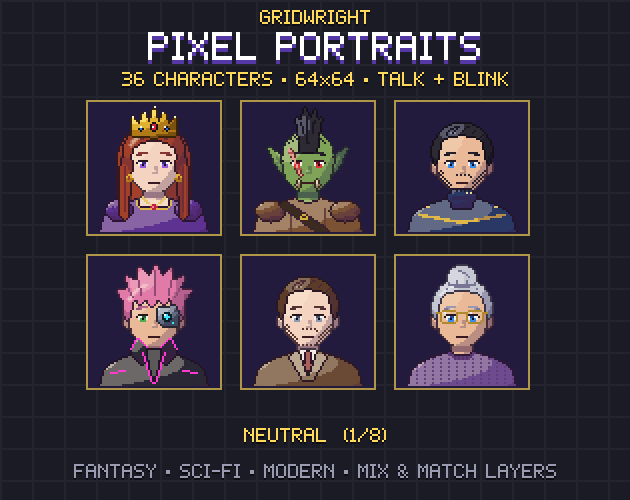
Keep the portrait at a whole-number scale of the game. Pixel Portraits are 64x64, and the cell sits in a 76x76 9-sliced frame, a 6-pixel border on every side. A Ren'Py game shows the same art bigger: the side images in Gridwright's Horror Portraits are 128x128 for 1280x720 and 192x192 for 1920x1080, exactly 2x and 3x. The Pixel Art Size Calculator shows how big one art pixel is on 720p, 1080p, 1440p and 4K screens before you draw anything.
Which expressions to draw
Count the moods in your script before drawing faces. Pixel Portraits gives each of its 36 characters eight: neutral, happy, sad, angry, surprised, thinking, scared and hurt. A horror cast needs another set, so Horror Portraits has neutral, scared, terrified, crying, angry, creepy smile, possessed and hurt.
- Start with neutral and the few moods your main plot leans on, then add the rest as the script asks.
- Let the eyes, brows and mouth carry the mood. At 64 pixels a frown is a change of a few pixels, so keep hair, hats and masks clear of them.
- Give every speaking character the full set, monsters and robots too. In Pixel Portraits the elderly, orc, alien and android characters all have eight.
- Choose the face per line. One surprised line in a calm talk still gets the surprised face.
Talk and blink frames
A still face next to typing text looks frozen. Pixel Portraits draws four frames for every expression: still, blink, talk 1 and talk 2, 1,152 frames for the whole cast. The pattern works in any engine:
- Loop talk 1 and talk 2 while the text types out.
- Show the still frame when the last character appears.
- Every few seconds, at an uneven interval, show the blink frame for a moment.
- Keep one sheet per character, with one row per expression, so changing the mood means changing the row.
In Godot the portrait can be a TextureRect, a Control that sits inside the box's layout, with its texture swapped for each frame. Set stretch_mode to Keep Centered; the reference says the texture then keeps its original size and stays centred in the node's rectangle, so the face is never scaled by an uneven amount.
Text that types out
A RichTextLabel shows the line. Its visible_characters sets how many characters are shown, and visible_ratio sets the fraction of the total. get_total_character_count returns the count without BBCode, so a coloured name doesn't throw off the timing.
The simplest typewriter is a Tween. Make it with create_tween, since the reference warns that a Tween made with Tween.new() can't tween values. Set visible_ratio to 0, then tween_property it to 1 over a duration in seconds that grows with the character count. A tween_callback at the end switches the portrait to its still frame and shows the next arrow.
Sound makes the talking land. Retro Sound Effects has 26 dialogue blips in 8-bit and 16-bit versions, among them eight voices (tiny, pip, mid, deep, robot, gruff, ghost and chirp) and sounds for text finished and the next text box. Give each character a voice and play its blip every few characters, and the knight and the goblin merchant sound different before the player reads their names.
Laying out the dialogue box
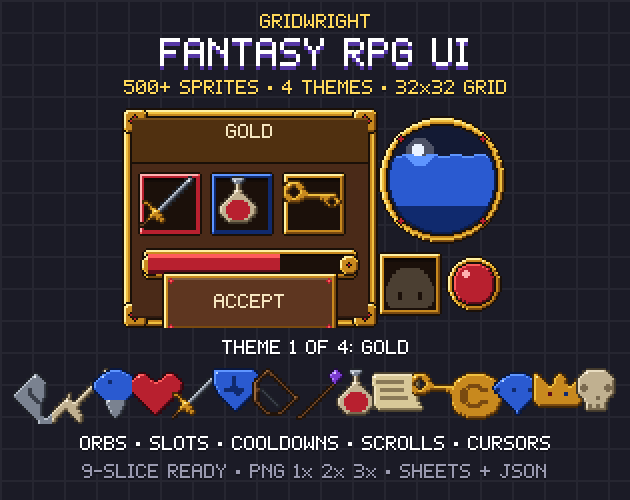
The box usually runs along the bottom of the screen, with the portrait at one end, a name plate over its top edge and the text beside the face. Fantasy RPG UI has those parts in each of its four themes: a 9-slice dialogue panel, square and round portrait frames, a name tag, a choice highlight and an animated next arrow, on a 32x32 grid.
- Stretch the panel with a NinePatchRect. Its patch margins set the corners, and the Tile stretch mode repeats the edges, which the reference says won't cause visible distortion.
- Put each speaker on their own side. With the hero on the left and the other speaker on the right, a talk reads like a conversation.
- Be careful with flip_h. It turns a face toward the text, but a scar, an eyepatch or a side parting moves to the other side with it.
- Keep the font at a whole multiple of its design size. Godot's fonts page says the size must be an integer multiple of the design size and the Control scaled by an integer too, or pixel text blurs.
- Leave room for choices. Two or three answers need a taller box or a second panel above it.
Portraits beyond the dialogue box
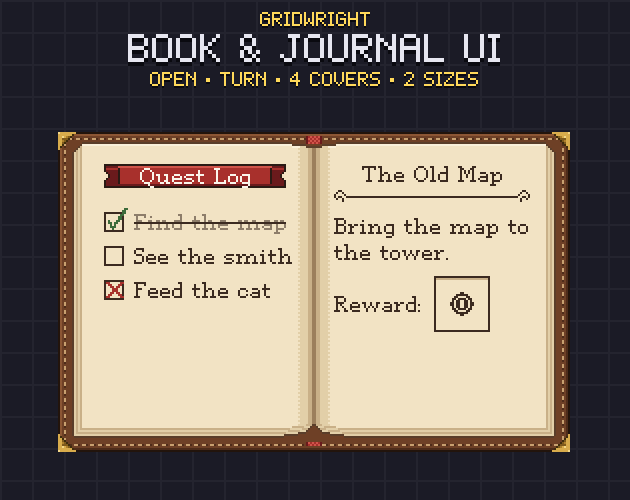
The same faces work in menus that remember people: a party screen, a list of the townsfolk, a journal of everyone the hero has met. Book & Journal UI has photo corners, ink boxes and a relations icon for such a page, and its JSON gives each page's writable area. It also includes the Gridwright Story font as TTF and BMFont, and Godot's fonts page says it reads BMFont's .fnt files.
Ren'Py side images
In Ren'Py the portrait beside the text is a side image. Ren'Py's docs say the character is declared with a linked image tag, and Ren'Py then looks for an image tagged side with that tag and as many of the shown image's attributes as possible. If two images tie, it shows none, so name the files with care. Ren'Py side images for a horror visual novel walks through the naming, and the Pixel VN UI pack's gw_side() fits a 64x64 pixel portrait into its side-image box.
A cast that matches
Most games need more faces than any premade set. Pixel Portraits has 36 characters across fantasy, sci-fi and modern, plus 330 layers to build more: bodies, eyes and mouths, hair, beards, outfits, headwear and face accessories. Its compose.py stacks any layers into one character sheet, and the build checks that no layer covers the eyes or mouth, so shopkeepers and quest givers look like they belong with the heroes.
A portrait checklist
- One portrait size, at a whole-number scale of the game.
- Every mood the script needs, for every speaking character.
- Talk frames while the text types, then still, with a blink now and then.
- A blip voice per character.
- Fonts at whole multiples of their size.
- Faces checked at 1x in the real box.
Pixel Portraits, Fantasy RPG UI, Book & Journal UI and Retro Sound Effects are on Gridwright, each bought once with a free sample to try first. Pixel Portraits' sample has 3 characters, one per genre, and 25 layers, enough to test the talk loop in your engine.
Gridwright packs can be used in commercial games; you may not resell the files themselves. Packs released from October 28, 2026 ask for a credit: “Art by Gridwright” with a link. The packs here came out before that, so for them a credit is optional. More in can I use game assets in a commercial game.