In a 48-hour jam the clock decides everything, and the hours lost hunting for a tileset at three in the morning are hours not spent on the game. A small kit of assets that is downloaded, unpacked and tested before the jam starts gives you a playable prototype on the first evening. This checklist covers what to put in that kit, how to set up your engine in advance, and the rules to check so nothing you use causes trouble with your entry.
First, read the jam's rules on assets
Jams differ. Some allow any outside assets as long as you credit them, some ask that the art and sound be made during the jam, and some rate graphics and audio as their own categories, where voters may expect you to have made them. Read the rules page before you download anything, and keep a text file of every asset you use with its source and licence. You will need it for the credits on your submission page, and it takes two minutes to keep up as you go instead of an hour to rebuild at the end.

The kit: what to have ready
- One ground tileset with autotiles, so a map can be painted in minutes.
- A set of characters with walk cycles in every direction you need.
- Hit, pickup and explosion effects.
- Sound effects for the actions almost every game has: jump, hit, pickup, menu click, game over.
- One pixel font with digits and a readable small size.
- A few interface pieces: a panel, a button, a health bar.
Everything in the kit should share a grid and a style. A jam game with mixed sizes and mismatched outlines looks unfinished even when it plays well, and nobody has time during a jam to redraw packs until they match. Picking packs made to work together solves that before the clock starts.
Ground: a tileset you can paint fast
The Top-Down Tileset is a good centre for a top-down kit: 1,113 tiles and props on a strict 16x16 grid. It has 47-tile autotile sets for grass, autumn, dirt, sand, snow and cobble, plus water and lava in 4 animation frames, cliffs for raised plateaus, a wood fence and a stone wall that join on all four sides, and props from trees, rocks and crates to chests and an animated campfire. The neighbour bitmask is in every file name and in tiles.json, so you can wire the sets to your engine's autotiling before the jam.
If the theme calls for a terrain the pack lacks, the Autotile Builder turns a small template into a full 47-tile set. A plain 3x3 island is enough to start, and its seam check paints a random map from your tiles and names the piece to fix when two tiles don't meet.
Characters that already walk
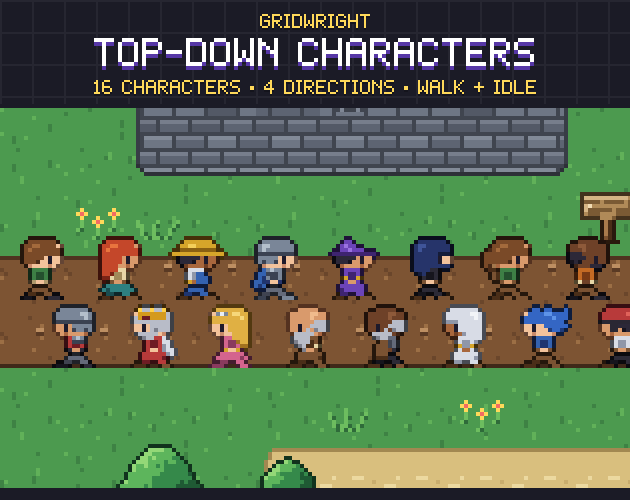
A walk cycle in four directions takes longer to animate than it looks. Top-Down Characters has 16 characters on the same 16x16 grid as the tileset, from a villager and a farmer to a knight, a mage, a rogue and a pirate. Each faces down, left, right and up with a 2-frame idle and a 4-frame walk, one frame per cell with the feet on the bottom rows, and JSON maps give the frame rectangles and the suggested animation speed.
The 12 emote bubbles (exclamation, question, heart, anger, sleep and more) are a quick way to show what a character thinks without writing dialogue. Pick the hero and two others before the jam and set up their animations in your engine once. Whatever the theme turns out to be, you will need something that walks.
Effects that make hits feel good
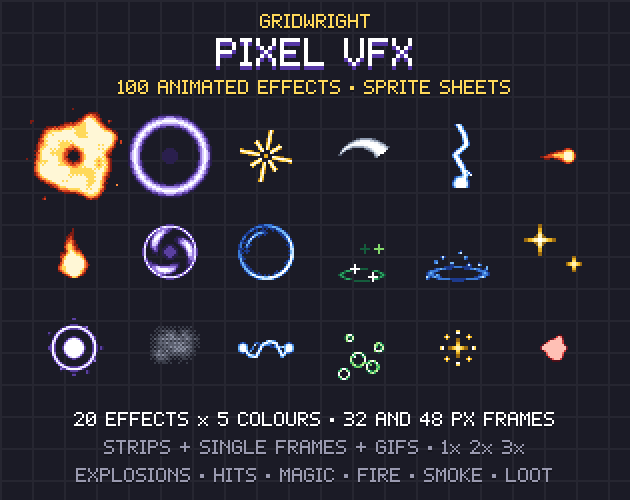
Effects are where a jam game earns its game feel. Pixel VFX has 20 effects in 5 colours each, 100 animations in all: explosions, hits, slashes, lightning, projectiles, shields, portals, smoke, dust, splashes, heals, sparkles and a pickup burst for coins and loot. They come as strips with one row of frames per animation, in 32x32 frames (48x48 for the two big ones), with no outlines and no half-transparent pixels, so they sit on any background. animations.json lists the frame size, the frame count, the speed (12 fps) and which ones loop.
A hit effect, a short screen shake and a sound on the same frame do more for a prototype than another hour of content. Wire that trio up before the jam and reuse it for every enemy.
Sound and a font
Silence makes a jam game feel broken. Retro Sound Effects has 352 sounds, each in an 8-bit and a 16-bit version, so 704 files as WAV and OGG: menu clicks, dialogue blips, coins, jumps, footsteps, lasers, explosions, hits, power-ups and more. Both versions use the same file names in two folders, so you can switch the whole game's sound style by changing one folder path.
For text, a font drawn at a small native size saves a lot of fiddling. Pixel Fonts has six fonts as TTF and as bitmap fonts: a 9 px 5x7 text font with bold, mono and outline versions, a 6 px Tiny font for HUD numbers, and a chunky Blocky font for the title screen.
Set up the engine before the jam
If the rules allow a base project made in advance, build it now. In Godot 4, set the resolution first. Godot's guide to multiple resolutions recommends the viewport stretch mode for pixel art, and the integer scale mode, which rounds the scale down to a whole number to prevent uneven pixel scaling. It suggests 640×360 as a good baseline because it scales to 1280×720 and 1920×1080. Set the texture filter to Nearest so sprites stay square. The Godot Pixel-Perfect Setup writes those project settings for your game's size and adds a camera script that keeps the camera on whole pixels.
Then import the kit: the tileset with its terrains, the characters' animations, and one scene that spawns an effect and plays a sound. When the theme is announced, you start from a project where a character already walks across a map.
A pre-jam checklist
- Rules read: are outside assets allowed, and how must they be credited?
- Kit unpacked in one folder, with a credits file listing every pack and its licence.
- Engine project with resolution, scaling and filtering set.
- Tileset terrains wired to autotiling.
- Hero animations set up, plus one placeholder enemy.
- A hit effect and a sound tested together.
- The font imported at its native size.
The Top-Down Tileset, Top-Down Characters, Pixel VFX, Retro Sound Effects and Pixel Fonts are on Gridwright, each with a free sample, so you can test your kit in your engine before the jam starts.
Gridwright packs can be used in commercial games, so a jam game can grow into a full release; you may not resell the files themselves. Packs released from October 28, 2026 ask for a credit: “Art by Gridwright” with a link. The five packs here came out before that, so for them a credit is optional, though a jam's own rules may still ask you to credit every outside asset. More in can I use game assets in a commercial game.