Two games can both be called top-down and look nothing alike. In one you see a character's face and the front of every house. In the other you look almost straight down at heads and roofs. This post calls the first high top-down and the second low top-down, and goes through how each one changes tiles and walls, character sprites, depth sorting and collision, then which suits which kind of game.
A note on the names
Both names are informal and can be read two ways. Read by how much of each object's height you see, high top-down is the view where walls and people stand up and show their fronts. Read by where the camera sits, a high camera looks more steeply down, and the names swap. Here, high top-down means the three-quarter view with visible fronts, and low top-down means the flat view from almost directly above. When you brief an artist, describe the angle as well as the name.
High top-down: the three-quarter view
The camera is above the scene and tilted toward its north side. Floors are squares on the grid, and everything standing on them shows its top and its front at once. A house shows its roof above a facade with a door and windows. A character shows a face when walking down the screen and a back when walking up.
This is the familiar view of handheld and console RPGs, farming games and many action adventures. Players read faces, outfits and buildings at a glance. The price is that the art has to cheat: floors are drawn as if seen from above, walls and people as if seen from the front, and every tile has to follow the same rules for where one becomes the other.
Low top-down: looking almost straight down
Here the camera points nearly straight at the ground. Walls become thick lines with a top surface, buildings are mostly roof, and a character is the top of a head with shoulders and arms. Height comes from shadows, outlines and size.
Overhead shooters, vehicle games, stealth games with vision cones and many strategy games use this view. It has less personality, since faces and facades barely show. In return every object sits where its footprint is, so the player can judge distances and aim exactly as the game measures them.
Tiles and walls
In high top-down the wall is the hardest piece in the tileset. A north wall shows its face, one or more rows of tiles tall on screen, with a top edge above it. A south wall shows only its top, or is left out so the player can see into the room. Side walls are thin strips. Cliffs follow the same rule, with a face only on the edges that face down the screen.
The Top-Down Tileset is drawn this way. Its 141 cliff tiles are raised plateaus in grass, sand and snow with a wall on the edges that face down the screen, and its ground terrains come as 47-tile autotile sets and 16-tile corner sets.
In low top-down a wall looks much the same from every side, so one set of edge tiles can run round a room in any direction, which makes walls cheaper to draw and simple to autotile. Floors work the same in both views. Our post on 47-tile blob and 16-tile corner sets compares the two formats.
Character sprites
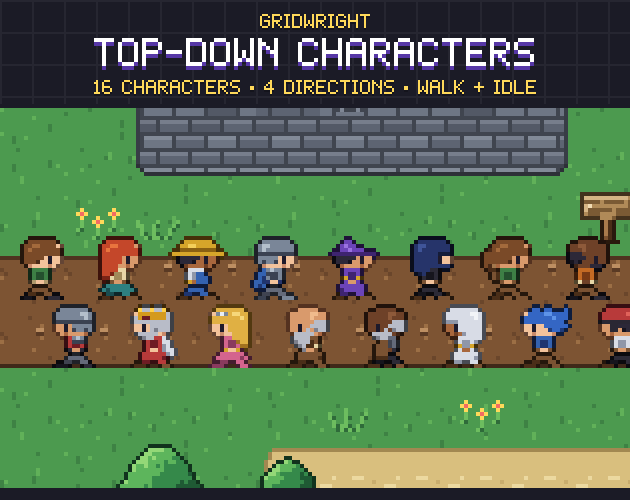
A high top-down character needs its own drawing for each direction it faces. Four directions is the usual minimum, and one side is often a mirror of the other. Diagonal movement usually reuses the side or front frames. Because the sprite shows a face, the engine can't simply rotate it, so eight directions means drawing eight. Characters also stand taller than the cell they occupy.
Top-Down Characters follows that pattern: 16 characters on a 16x16 grid, each with down, left, right and up, a 2-frame idle and a 4-frame walk, 24 frames per character. The feet sit on the bottom rows of each cell, and a separate shadow goes under them.
A low top-down character can often be drawn once and turned by the engine to any angle, which suits mouse aiming and vehicles. Light drawn into the sprite turns with it, so keep the shading even or light it from straight above. Small pixel art can also look ragged when rotated, so test the angles your game really uses.
Depth sorting
Depth sorting decides what is drawn in front. In low top-down it matters little, because objects rarely overlap on screen; canopies and roofs can go on a layer above everything, and the player walks under them.
In high top-down it matters all the time: a character behind a tree is hidden by the trunk, and one in front covers it. The usual rule is that whatever is lower on the screen is drawn in front, measured where it touches the ground: the feet for a character, the base for a prop.
In Godot 4, Y Sort Enabled on a node draws it and its children with a higher Y position in front of those with a lower one. A Y-sorted TileMapLayer groups its tiles by Y position, and each tile has a Y Sort Origin, the vertical offset in pixels used for sorting, so a tall tile can sort from its base. Godot's docs advise using several TileMapLayer nodes, so keep the ground on one and walls and trees on another. Turn on Y-sorting for that layer and for the node holding your characters, then walk a character round a tree to check.
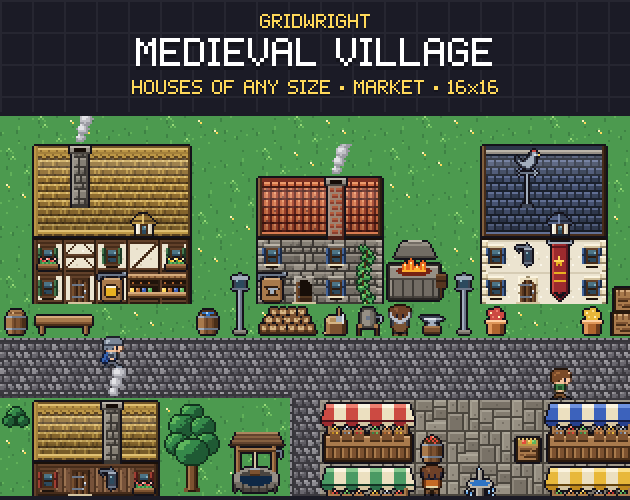
Art that stands on its bottom row makes this simple. The 57 larger pieces in Medieval Village, such as the 32x48 trees and the 48x64 windmill, are exact multiples of the grid and stand on their bottom row.
Collision shapes
In low top-down the collision shape is close to what you see. A wall tile is solid across the whole cell, and a character is a circle about the size of its body. What blocks bullets and sight on screen also blocks them in the game.
In high top-down the sprite is taller than the ground it stands on, so collision covers the footprint only. A character gets a small box around the feet, so it can walk up to a wall while its head overlaps the wall's face. A tree gets a shape around the trunk, so the player can walk behind the canopy. Line of sight and bullets need their own shapes.
In Godot you add a physics layer to the TileSet, then draw shapes per tile. Pressing F in the TileSet editor creates a rectangle, and you can edit its points to cover only the base of a wall or trunk.
Which angle to pick
- Towns, people, farming or exploring a world: high top-down, where faces and buildings carry the mood.
- Aiming in any direction, or vehicles: low top-down, where one sprite can turn to any angle.
- Stealth, vision cones or line of sight at the centre of play: low top-down, because what blocks the view on screen matches the collision.
- Little art time and many characters: count the drawings first. A low top-down character can be one rotated sprite, and a high top-down one needs at least front, back and side.
- Tactics or board-like games on a grid: either works. Low top-down reads cleanly, and high top-down gives units more character.
- Cliffs, stairs and several floors: high top-down shows height better than the flat view. If height is the whole point, read isometric vs top-down pixel art.
Keep one angle per map
Mixed angles are where top-down art most often looks wrong. A character with a face on a map drawn straight down makes the eye stop. Pick one angle for everything on the map and check each new asset against it before you build levels. Menus, icons and portraits can use any angle. The tile size goes with the angle, because a three-quarter character is taller than its cell, so see how to choose a pixel art tile size and settle both together.
Trying the high top-down look
The three packs used as examples here share one 16x16 grid and one three-quarter view: the Top-Down Tileset for terrain, cliffs and props, Medieval Village for houses built from roof and facade pieces in 4 roof styles and 4 facade materials, and Top-Down Characters for the people. The village pieces have no baked shadows, so your own can match your lighting. One street built with them shows whether the three-quarter look suits your game. Gridwright Studio starts with 7 free days.
Gridwright packs can be used in commercial games; you may not resell the files themselves. Gridwright packs can be used in commercial games; you may not resell the files themselves. Packs released from October 28, 2026 ask for a credit: “Art by Gridwright” with a link (each pack’s LICENSE.txt says which applies). Packs released from October 28, 2026 ask for a credit: “Art by Gridwright” with a link (each pack’s LICENSE.txt says which applies). More in can I use game assets in a commercial game.