Weather plays over the whole screen for minutes, long enough for players to spot two flaws: the seam, where a loop's edges or last frame don't match, and the repeat, the same drops coming past again and again. Fix the seam in the art; hide the repeat in how you play it.
Why a weather loop gives itself away
- A seam in space. A streak that leaves the tile's right edge doesn't return on the left, so every tile border shows missing or doubled drops.
- A seam in time. The last frame doesn't flow into the first, and the screen jumps once per loop. Each drop must travel a whole number of tiles per loop: at 16 px a frame, a 128 px tile closes after 8 frames.
- The repeat. A 128 px tile fills a 640x360 screen 5 times across and almost 3 times down, so any cluster of drops marches past in a grid the eye finds within seconds.
Check the tile first
Lay the tile out 3x3, check the joins, and watch the loop wrap for a full minute. For your own art, shift the tile by half its width and height so the edges meet in the middle, fix them there and shift it back.
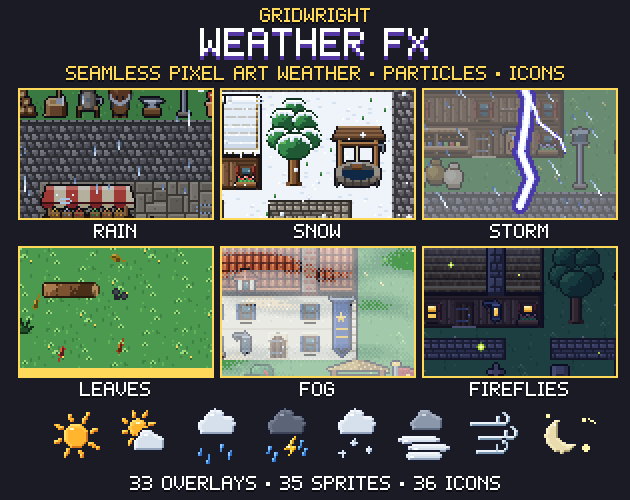
Weather FX is built around this check: its 33 overlays are 128x128 tiles that repeat in both directions, each last frame flows into the first, and the build checks both for every overlay. Rain comes as light, medium, heavy, windy and storm, next to splashes, snow, hail, thin and thick fog, and leaves.
Hide the repeat with two layers
Stack two copies, or two strengths such as light and heavy rain, and make them differ in three ways:
- Offset. Shift the second layer by an uneven amount, say 37 px across and 53 px down, so the tile corners never line up.
- Speed. Avoid simple ratios: at 1:2 the pair repeats as often as the slow layer. Snow layers at 40 and 55 px a second over a 128 px tile repeat every 3.2 and about 2.3 seconds alone, but together only after 25.6 seconds.
- Phase. Start the second animation on another frame, so the two loops never wrap together.
Keep the back layer dimmer and slower for depth. Weather FX's JSON gives each overlay its opacity and blend, and its 18 presets say which layers to stack.
In Godot 4, use Parallax2D. Its guide asks for a seamless image at least as big as the viewport, so build one: a TextureRect with its stretch mode set to Tile (and texture repeat Enabled) fills its rectangle with the tile. Size it in whole tiles, such as 640x384 for 128 px tiles on a 640x360 screen, put it under a Parallax2D and set repeat_size to match. autoscroll, a velocity in pixels per second with an x and a y, then sets both the fall and the wind.
Screen space or world space
Rain that ignores the camera looks as if it runs down the glass. With ignore_camera_scroll on, the camera doesn't move a Parallax2D. With it off, scroll_scale sets its speed against the camera: 1 matches it, and below 1 looks farther away. Try the near layer at 1 and the far one slightly below; how to make parallax backgrounds has more on layer speeds.
Tints, flashes and the HUD go on a CanvasLayer, which stays fixed in screen space; higher layer numbers draw on top.
Particles where the pattern must break
Particles have no pattern but cost more per drop, so use them where the eye looks: big drops near the camera, flakes in front of the player, splashes on the ground. Weather FX has 25 particles in 16x16 cells, among them raindrops, splashes, ripples, snowflakes and leaves. In GPUParticles2D, set:
- Emission shape Box, wider than the screen and above its top edge. The extents count from the centre in both directions.
- Direction, spread and gravity. Spread is the angle either side of the direction: small for rain, wider for snow.
- Preprocess, so the system starts as if it had already run, not on an empty screen.
- Local Coords off, the default. Drops then use global coordinates and stay in the world when an emitter that follows the camera moves.
- A Visibility Rect that covers the whole fall, or particles appear or vanish as the node enters or leaves the screen.
2D particles collide only with LightOccluder2D nodes, so it is simpler to end drops with their lifetime and emit splashes separately at ground level.
Wind angle and fog speed
Scroll a windy overlay along the angle of its streaks, or the drops slide sideways along them, and send particles, leaves and fog the same way. Weather FX has windy and storm rain as overlays of their own, plus wind gusts for left and right.
Fog should move far slower than rain. At 4 px a second a 128 px tile takes 32 seconds to pass, and two fog layers at different speeds hide what is left of the repeat.
Wet ground, puddles and snow cover
While it rains, darken and cool the scene with a CanvasModulate, which tints every node on its canvas; a HUD on its own CanvasLayer keeps its colours. Weather FX has 8 tints, among them storm, overcast and cold.
For puddles, paint small patches of water on a layer shown only in the rain, with ripples emitted from a box over each. The Top-Down Tileset has animated water as a 47-tile autotile, transparent outside its shape so it lies on any ground, and its snow set can fade in the same way above the grass.
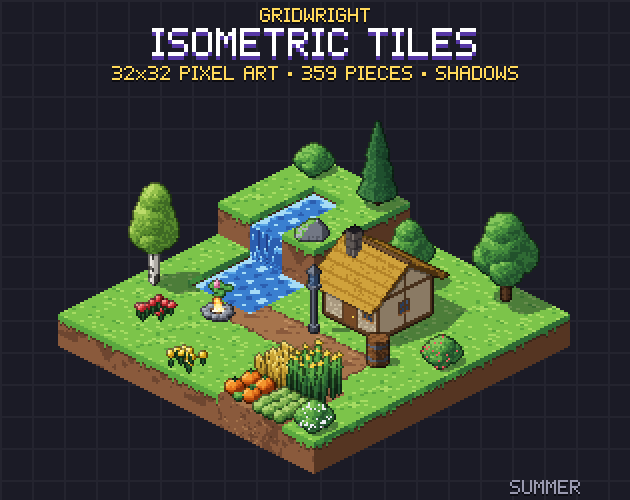
On isometric maps, Isometric Tiles has snow blocks and floors, snowy trees and ice. Its shadows are separate sprites, so under a heavy sky you can draw them fainter or leave them out.
Changing weather without a pop
Never swap weathers in a single frame. Fade with a Tween: tween_property moves a value such as a layer's alpha, and set_parallel runs several tweens at once. A change from clear to storm might go:
- The tint moves to overcast over a few seconds.
- Light rain fades in and the splashes start.
- Heavy rain fades in as the light layer fades out, and the tint moves on to storm.
- The puddles appear, then the lightning starts.
For particles, change amount_ratio, not amount. Changing amount restarts the system, while amount_ratio leaves the drops already in the air alone, so at 0 the last drops finish their fall. Weather FX's three lightning bolts come with a ground impact, and its 24 animated weather icons suit a forecast in the HUD.
Pixel-perfect scaling
1 px rain needs whole-number scale. Godot's guide to multiple resolutions points pixel art to the viewport stretch mode with the integer scale mode, and its suggested 640x360 base scales to 1280x720, 1920x1080, 2560x1440 and 3840x2160. Use Nearest filtering and never scale a weather layer by a fraction, or its drops come out in two widths. The Godot Pixel-Perfect Setup writes these settings for your resolution.
Performance notes
- CPUParticles2D is slower with many particles, but may perform better on low-end systems or when the GPU is the bottleneck.
- Turbulence has a high GPU cost. Godot advises it on a few systems at most, and off for mobile and web.
- Preprocess runs the particle shader many times in a single frame, so keep it near the lifetime.
- A low amount_ratio saves nothing, since resources are allocated for the full amount. Set amount for your heaviest weather.
For drops and flakes of your own, the Particle FX Baker starts from presets that include rain, snow and dust and bakes them into seamless sprite sheets with a JSON map of the frames.
Weather FX, the Top-Down Tileset and Isometric Tiles are on Gridwright, each bought once with a free sample to try first.
Gridwright packs can be used in commercial games; you may not resell the files themselves. Packs released from October 28, 2026 ask for a credit: “Art by Gridwright” with a link. The three packs here came out before that, so for them a credit is optional. More in can I use game assets in a commercial game.