A survivors-like looks simple: one hero, a growing crowd and gems to pick up. The asset list is longer than it looks, because everything is on screen at once and the player reads it at a glance while dodging. This checklist follows a run, with sizes, frame counts and the Godot 4 notes that matter once hundreds of enemies are on screen.
Pick the screen size first
Every other size follows from how big a pixel is. For pixel art, Godot's page on multiple resolutions says to set the stretch mode to viewport and the scale mode to integer, which stops uneven pixel scaling. It names 640x360 as a good baseline, because it scales to 1280x720, 1920x1080, 2560x1440 and 3840x2160 without black bars.
At 640x360 a 16x16 enemy is a fortieth of the screen's width (640 / 16 = 40), so a big crowd still leaves open ground to run for. Fodder fits 16x16, tougher enemies 32x32, and bosses are much larger. The trade-offs of each grid are in 16x16 vs 32x32 vs 48x48 pixel art.
Enemies: tiers you can read in a crowd
In a crowd the player reads shape and colour, not detail, so give each tier a silhouette of its own:
- Fodder: small, slow and many, one clear shape each (slime, bat, skeleton).
- Tough walkers: a size up, slower and with more health, so the player sees which ones to lead around.
- Odd movers: fliers, and ghosts that cross walls. A different movement deserves a different outline.
- Elites: an existing enemy in a stronger colour or with a glow, dropping a chest.
- Bosses: a size of their own, with attacks the player can see coming.
Colour variants are the cheapest tier ladder: one sprite in three colours can be three levels of one enemy. Keep one meaning per colour across the roster, so red means the same thing on every map.
How many frames each enemy needs
- Move: a 4-frame loop is enough for fodder.
- Hurt: one frame, often with a white flash, so every hit shows.
- Death: about 4 frames, short enough that the next wave isn't waiting behind it.
- Facing: fodder can flip left and right; walkers look better in 4 directions, with an idle if they ever stop.
- Bosses: a full set. Pixel Bosses gives each boss idle, move, attack, special, roar, hurt and death, in a normal and an enraged phase.
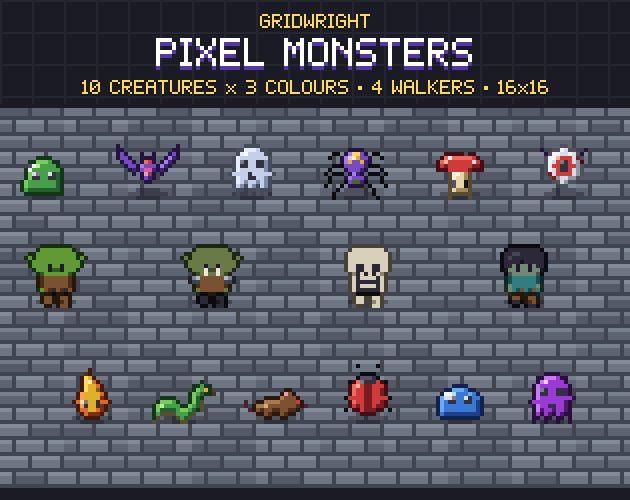
Pixel Monsters follows the fodder plan: 10 creatures in 3 colours each, every one with a 4-frame move loop, a hurt frame and a 4-frame death, plus four walking monsters in 4 directions. Survivors Horde is made for this genre, with 24 animated enemies at 16x16 and 32x32, bosses, XP gems and weapon icons.
In Godot, AnimatedSprite2D's animation_finished signal is emitted when an animation reaches the end, and playback then pauses: the moment to drop the gem and put the enemy away.
XP gems and pickups
- XP gems in a few values, each with its own colour and size, smaller than any enemy so they never read as a threat.
- A short sparkle on the gems, and a burst when one is collected.
- Food that heals, gold, a magnet that pulls every gem in, a bomb and a chest after an elite.
- Breakable props that drop them, so the map gives something besides enemies.
Godot's physics layers make pickups cheap. Each collision object has 32 layers: the layer is where an object appears, the mask is what it scans for. The docs' own example is a player that detects enemies and coins while enemies and coins ignore each other, which is a survivors-like in one sentence. Put gems on a layer only the player's pickup area masks, and a magnet is just a larger area. The Area2D docs note that its overlap lists change once per physics step and suggest using signals instead.
Weapons, upgrades and their icons
- One icon per weapon, plus its evolved form, and one per passive.
- Level pips or a number on each slot.
- Rarity frames for the level-up cards.
- Status icons for burning, frozen or poisoned enemies, and for the hero's buffs.
Icons are read at two sizes: large on a level-up card, small in the HUD. Skill & Status Icons has 80 skill icons at 32x32 in 10 classes, 40 buffs and debuffs at 16x16, 6 rarity frames, an 8-frame cooldown sweep and stack counts from 1 to 9.
Hit and death effects
- The weapon's own effect: slash arcs, projectiles, auras.
- A hit spark on every hit, a few frames long and played once, and a bigger one for criticals.
- A death puff, and explosions for bombs and area weapons.
- Status loops on affected enemies.
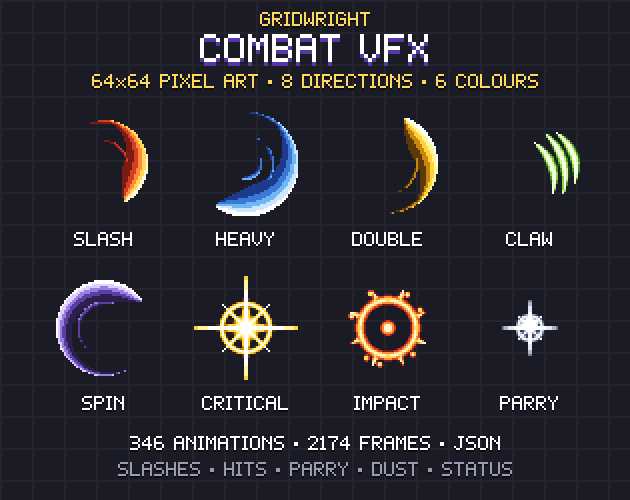
Timing matters more than detail. Combat VFX ships a JSON for every sheet with the fps, loop or play-once, the anchor point and the hit frame where damage should land, so the number and the spark appear together. Its 6 colours (steel, fire, frost, shock, venom, arcane) can stand for weapon elements.
For particles, Godot's 2D particle page recommends GPUParticles2D unless you have an explicit reason not to, and says CPUParticles2D may perform better on low-end systems. With one_shot on, a node emits all its particles once and then never again, which suits a death burst.
Damage numbers
Damage numbers need small digits that stay legible over any ground: 3x5 or 5x7 digits with a dark outline, one colour for normal hits and another for criticals, merged or capped when dozens of hits land at once. Pixel Fonts has a 3x5 Tiny font for HUD numbers and an Outline layer that draws under its 5x7 text.
HUD and the level-up screen
- The run timer at the top, and an XP bar across the screen with the level.
- A small health bar under the hero, where the player's eyes already are.
- Kills, gold, and the weapon and passive slots with their levels.
- A boss health bar that appears only with a boss.
- The level-up screen: three cards with an icon, a name, the next level and one line of text, while the game pauses.
- The screens around a run: title, hero select, chests, pause, results and settings.
Sounds
- Hits and enemy deaths, with some pitch variation and a limit on how many play at once.
- Gem pickups, coins, health and the level-up sound.
- Player hurt, a low-health loop and a boss-defeated sound.
Retro Sound Effects covers most of this: coins and gems, power-ups and level up, hits and critical hits, enemy hurt and death, boss defeated and a low health beep loop, each in an 8-bit and a 16-bit version with the same file name.
Performance with hundreds of enemies
- Profile first. Godot's CPU optimization page calls the profiler the easiest way to find bottlenecks.
- Count your nodes. The same page warns that every node has a cost.
- Reuse enemies and effects. It suggests reusing physics objects (8 monsters per area, for example) and removing nodes from the SceneTree rather than hiding them; a detached node doesn't have to be deleted.
- Keep masks tight, so enemies don't scan for gems.
- Use servers last. Godot's servers page says tens of thousands of instances processed every frame can become a bottleneck, but suggests servers only once other optimizations are exhausted.
A complete starting point
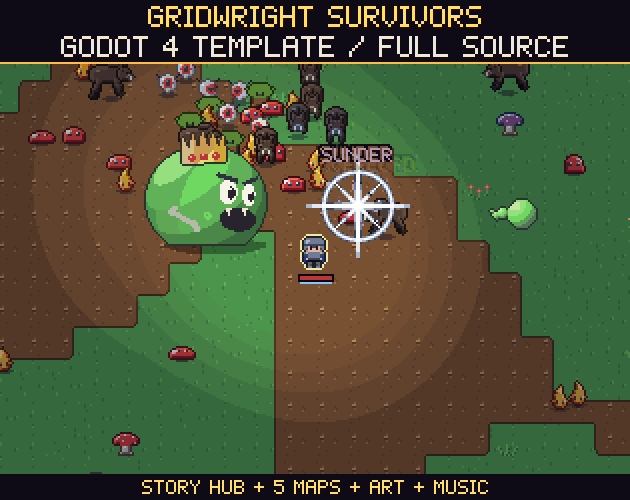
To start from a working game, the Survivors Template is a full survivors-like as Godot 4 source: XP crystals, pick-1-of-3 level-ups, elites and chests, 14 weapons in 6 elements and 37 kinds of monsters with hundreds on screen at once. It has about 8,300 sprites from 16 Gridwright packs, 13 music tracks and 33 sound effects, keeps every number in one data file and has a test bot that logs frame time per system. It needs Godot 4.7. Every pack in this post is on Gridwright, each bought once with a free sample to try first.
Gridwright packs can be used in commercial games; you may not resell the files themselves, and the Survivors Template may not be shared as a template or source release. Gridwright packs can be used in commercial games; you may not resell the files themselves. Packs released from October 28, 2026 ask for a credit: “Art by Gridwright” with a link (each pack’s LICENSE.txt says which applies). Packs released from October 28, 2026, Survivors Horde among them, ask for a credit: “Art by Gridwright” with a link (each pack’s LICENSE.txt says which applies). More in can I use game assets in a commercial game.