Four directions or eight is one of the first choices in a top-down or isometric game, and it is hard to change later, because every animation you add afterwards is drawn in that many directions. This guide covers the frame cost, mirroring, how movement and aiming feel, which games use which, and how to snap input to a facing in Godot 4, checked in its 4.7 documentation.
What 4 and 8 directions mean
With four directions a character faces down, up, left or right. With eight it also faces the diagonals: down-right, up-right, up-left and down-left. With four, a character walking diagonally shows a straight facing, so it seems to slide a little sideways. With eight, every keyboard direction has its own drawing.
A stick or a mouse can point anywhere, so the sprite shows the nearest facing. With eight it is never more than 22.5 degrees off (360 / 8 / 2). With four it can be 45 degrees off (360 / 4 / 2), a full diagonal.
Isometric games turn this around. On a 2:1 isometric grid the cell edges run diagonally across the screen, so a character stepping from cell to cell, as in most tactics games, always moves along a screen diagonal. Four facings cover that, but they are the diagonal four. Free movement on an isometric map needs all eight. The views themselves are compared in isometric vs top-down pixel art.
Frame counts and art cost
Directions multiply everything. A character's frame count is the frames of all its animations added up, times the directions. Here is how that comes out in three of our packs:
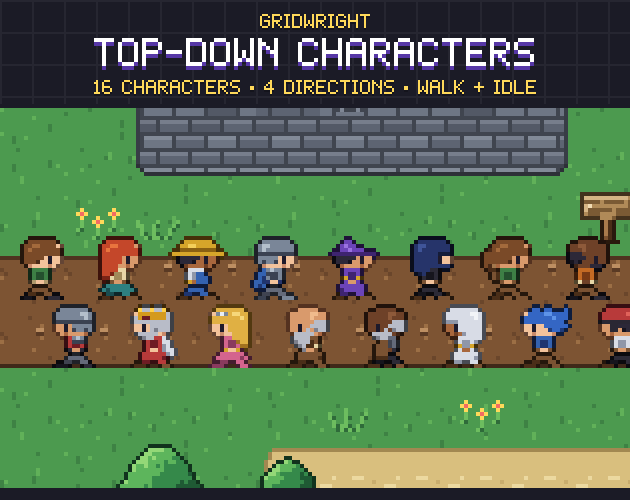
- Top-Down Characters: 4 directions, a 2-frame idle and a 4-frame walk. 6 frames x 4 directions = 24 frames a character, and 384 for the 16 characters.
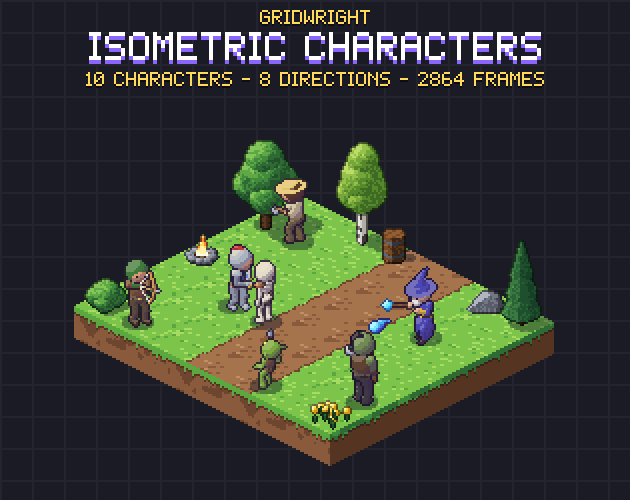
- Isometric Characters: 8 directions with idle, walk, run, attack, hurt and death, plus a block or work moves for some. The knight has 39 frames per direction, so 39 x 8 = 312, and the 10 characters come to 2,864 frames.
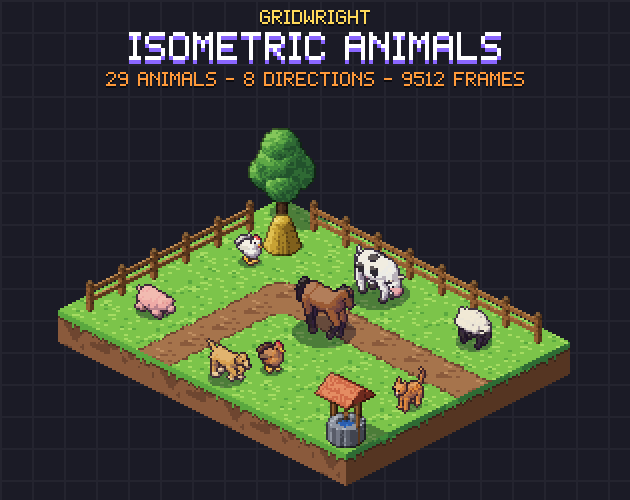
- Isometric Animals: 8 animations at 41 frames per direction, so 41 x 8 = 328 frames an animal, and 9,512 for the 29 animals.
Doubling the directions doubles every later addition too. An 8-frame walk is 32 drawings in four directions and 64 in eight, and so is the next attack you add after launch, and the next outfit or colour variant. On a tight budget, four directions with more animations can give a character more life than eight with only a walk.
Mirroring left and right
Mirroring is the usual saving: the left-facing frames are the right-facing ones flipped. In Godot an AnimatedSprite2D has a flip_h property, and the docs say that when it is true the texture is flipped horizontally. With four directions you draw down, up and right, and flip right for left: 3 of 4. With eight you draw down, down-right, right, up-right and up, and flip the other three: 5 of 8. For an 8-frame walk that is 24 drawings instead of 32, or 40 instead of 64.
The cost is handedness. A flipped knight holds his sword in the other hand, and a quiver jumps to the other shoulder. Small symmetric figures hide it well. Top-Down Characters works this way: its README says left is the right-facing frames mirrored, and they ship as their own row on every sheet, so there is no flip to set in code. Isometric Characters and Isometric Animals draw every direction and mirror none, so the knight's sword stays in his right hand and his shield on his left arm.
How movement and aiming feel
Four directions suit movement that already follows the grid axes. In a tile RPG, a farming game or a block-pushing puzzle the character steps from cell to cell in straight lines, so a diagonal facing would rarely show. The facing shows the tile the player will act on next.
Eight directions suit free movement and aiming. When a player holds a stick at an angle, or aims with the mouse in a twin-stick shooter or a survivors-like, the body should point roughly where the shot goes. With four, a shot fired up-right comes from a character facing up or right, and it reads as wrong. The Ranger in Isometric Characters draws, aims and shoots in all 8 directions, and the pack ships the arrow in 8 directions with a spawn frame and point for each, so the arrow leaves from the bow.
Eight is still a snap. For finer aim, one way is to keep the body in eight directions and turn only the projectile or a separate weapon sprite to the exact angle.
Which games use which
- Four directions: grid-based RPGs and adventure games, farming and life sims, puzzle games that move tile by tile, and small characters such as 16x16 townsfolk.
- Eight directions: action RPGs with free movement, twin-stick shooters, survivors-likes, and anything aimed with a mouse or a stick.
- Isometric games: the four diagonals for tactics games that move cell by cell, all eight for strategy games, city and colony builders and action games where units walk anywhere.
- Mixed: eight for the hero and the enemies who fight, four for townsfolk who walk set paths.
Our packs follow the same lines. Top-Down Characters is made for RPGs, farming games, adventure games and roguelikes. Isometric Characters is for tactics and action RPGs, strategy games, colony builders and survivors-likes, and Isometric Animals for farming sims, city builders, survival and hunting games. The two 8-direction packs share one 64x64 cell, anchor and JSON format, so a farmer and his cows can go through one code path.
Snapping input to 4 or 8 directions in Godot 4
Input.get_vector takes four actions, such as left, right, up and down, and returns one vector. The docs say its length is limited to 1 and it has a circular deadzone, which suits movement. Move the character by that vector, and turn it into a facing only when it isn't zero, so a character that stops keeps looking the way it walked.
Vector2.angle returns the angle from the positive X axis in radians: Vector2.RIGHT gives 0 and Vector2.DOWN gives PI / 2, because Y points down in 2D. TAU is a full turn, 360 degrees. Divide the angle by TAU / 8, round it with roundi and wrap it with posmod(n, 8), which wraps negative numbers too, so -1 becomes 7. The result is 0 right, 1 down-right, 2 down, 3 down-left, 4 left, 5 up-left, 6 up and 7 up-right. For four directions divide by TAU / 4 and wrap by 4: 0 right, 1 down, 2 left, 3 up.
Diagonals, turns and speed
One catch with four: a keyboard diagonal sits exactly halfway between two facings, so rounding alone decides, and the two sides of the screen may not agree. Set the rule yourself, for example keep the current facing while two keys are held.
Build the animation name from the move and the facing, such as walk_down_right. With mirrored art, play the right-hand animation and set flip_h for the left-hand ones. The docs say changing the animation resets the frame counter and the frame progress, so a character turning mid-stride restarts its walk. Their example saves the frame and progress, plays the new animation and puts them back with set_frame_and_progress. That works when every direction of a move has the same number of frames, as in all three packs.
On a 2:1 isometric map the same distance in the world covers more screen pixels sideways than up and down, so both isometric packs give the walk and run speed per direction in their JSON, and the feet don't slide.
Before you commit
If you make your own art, the cheapest eight directions are the ones you don't draw by hand: build the figure once in 3D and render it from every angle. Isometric Characters and Isometric Animals are drawn by code that way. The 3D Sprite Rotator does it for your own model: draw a front, side and top view or paint voxels, and it renders a pixel-art sprite sheet at 4, 8 or 16 directions. Its free edition takes models up to 32 per side at 4 angles. The full edition in Gridwright Studio takes up to 128 per side at 8, 16 or up to 64 angles, with JSON and a Godot 4 export.
Then check:
- Movement along the grid axes: four directions, the diagonal four on an isometric grid. Free movement or aiming: eight.
- Count the frames first: frames per animation, times directions, times characters and variants.
- Mirror only figures with nothing one-sided on them.
- Give every direction of a move the same frame count, so a turn keeps the stride.
- Keep the last facing when the input is zero, and decide what a keyboard diagonal does with four.
For the animations themselves, see isometric character animation. All three packs can be used in commercial games, with the sprites shipped inside your game. You may not resell or redistribute the files, and none of the three needs credit, though it is appreciated. More in can I use game assets in a commercial game.