A boss fight is a test the player passes by learning which attack is coming, where it will land and when the rules change. In pixel art all of that has to read in a few frames and a few dozen pixels. This guide covers the arena, telegraphs, hit and hurt boxes, phases, the boss bar and effects, with the Godot 4 nodes for each.
Size the arena around the boss
Start with the screen. Godot's page on multiple resolutions suggests the viewport stretch mode and the integer scale mode for pixel art, and calls 640x360 a good baseline because it scales to 1280x720, 1920x1080, 2560x1440 and 3840x2160. At that size a 96x96 boss cell is just over a quarter of the screen's height, and about six and a half of them fit across.
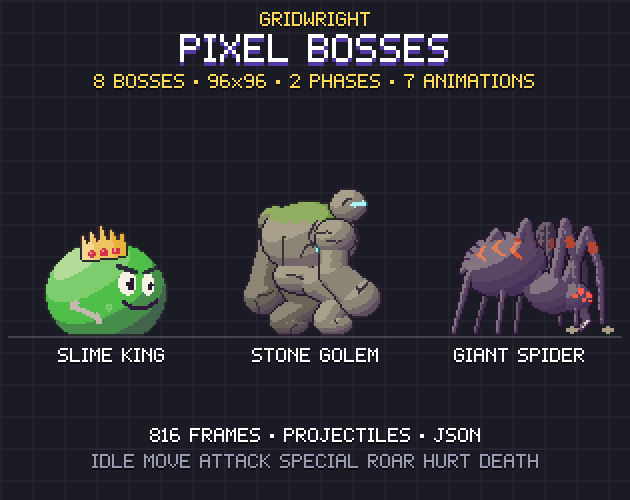
Pixel Bosses uses that cell for all eight of its bosses, and standing they are 55 to 88 px tall at 1x, 1.7 to 2.75 times the height of a hero's 32x32 cell, with most of the screen left open for dodging. Then shape the arena:
- Leave room behind the player to back away from the boss's longest reach, with a step to spare.
- Keep the fight on one screen if you can, so every wind-up starts where the player can see it.
- Lock the camera. Camera2D's limit_left, limit_right, limit_top and limit_bottom stop it at the arena walls. Its offset is meant for camera shake and may go past those limits.
Telegraphs: the wind-up is the lesson
A telegraph is the boss showing its next move before it hits. A 96 px boss has no room for a narrowed eye, so the whole body carries the warning:
- A pose you can read in silhouette: rearing up, raising a club, pulling an arm back. Filled with black, the move should still be clear.
- A hold on the last wind-up frame. Repeating that frame is the cheapest difficulty setting you have.
- A glow on the part that will hit, such as the fist, the mouth or the staff.
- A sound for any attack that starts off screen or behind the player.
- A mark on the ground for attacks from above, shown before the hit arrives.
Give each attack a tell of its own: the Stone Golem in Pixel Bosses stomps, slams with both fists and throws boulders, each from a different pose. Every boss has an 8-frame attack and a 10-frame special, and the pack's JSON marks which attack frames deal damage. The frames before them are the wind-up, and the ones after are the recovery, when the player hits back.
Hurt boxes, hit boxes and fairness
The hurt box is where a character takes damage, and the hit box is where an attack deals it. The horror enemy design guide covers them for small enemies. A boss is big enough to need a few rules of its own:
- Make the boss's hurt box generous, close to its drawn body, so a hit that looks like it connects does.
- Make its hit boxes a little smaller than the drawn claw or club, so a graze on the last pixel costs nothing.
- Turn hit boxes on only for the hit frames. A box left on through the recovery punishes the player for touching a boss that has finished its swing.
- Keep the hurt animation for staggers and big hits. Each boss in the pack has a 3-frame hurt, and a boss that flinches at every hit can be stun-locked; a short flash covers the rest.
Pixel Bosses' JSON gives the attack's hit frames and hit box, the special move's spawn frame and point, and every frame's opaque box, which works as a hurt box. The left-facing sheets are separate files with their own JSON, so their boxes match those frames.
Wiring the boxes in Godot 4
- Use an Area2D for each box, with a CollisionShape2D child. The docs describe Area2D as a region of 2D space that detects other collision objects entering or exiting it.
- Keep the sides apart with physics layers. Every collision object has 32: the layer is where it appears, the mask is what it scans for. Name them in Project Settings > Layer Names > 2D Physics and let each hit box mask only the other side's hurt layer, so a slam never damages the boss.
- Switch the hit box per frame. AnimatedSprite2D emits frame_changed when its frame changes; compare frame with the JSON's hit frames and set the shape's disabled property, which CollisionShape2D's docs say to change with set_deferred().
- Or key it in an AnimationPlayer. A property track in Discrete mode updates only on keyframes, and a call method track calls a function at a precise time, such as spawning the boulder on the special's spawn frame. Method keys don't run when you preview in the editor, so test them in the running game.
- Use the area_entered signal; an Area2D's overlap lists change only once per physics step. Resize shapes with their size handles, since Godot's physics introduction warns never to scale them in the editor.
Phases: show that the rules changed
A second phase tells the player that what they learned still counts and will now be pushed harder. Every boss in Pixel Bosses has a normal and an enraged phase. The enraged one is every frame again in a new palette with glowing eyes, cores or cracks: the golem turns to magma and the treant to blood-red autumn. Between them, play the 6-frame roar.
- Trigger the change at a share of the boss's health, and mark that point on the boss bar.
- Make the roar safe. While it plays, the boss neither deals nor takes damage, and the player gets a breath.
- Swap the palette as the roar starts, so the new look and the new rules arrive together.
- Change one or two things in behaviour, such as shorter gaps between attacks or a second projectile. The poses are the same in both phases, so the tells the player learned still work.
The 10-frame death, after which the boss stays down, suits one more method key. Godot's own example calls queue_free() at the end of a death animation; a boss's key can open the arena door.
A boss bar the player can read
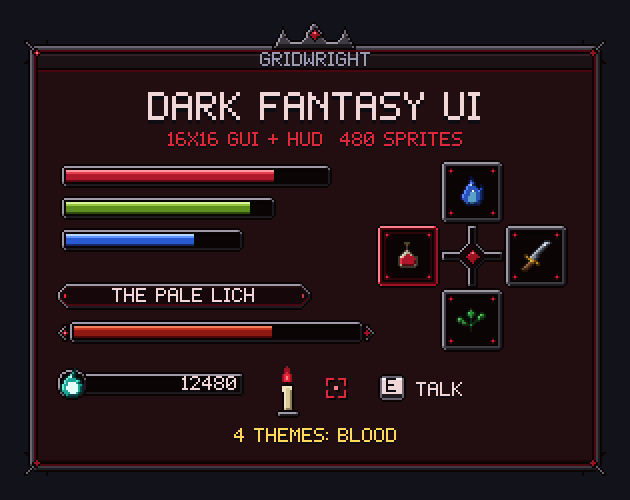
The boss bar runs wide across the top or bottom of the screen and shows only during the fight. Dark Fantasy UI has one with ornamented ends and a boss name plate in each of its four themes, with a boss fill and a damage trail fill, the pale part that drains after a hit. Its frames are 9-slice ready.
In Godot, a TextureProgressBar draws texture_under, texture_progress and texture_over, and nine_patch_stretch lets the frame take any width. tint_progress multiplies the fill's colour, an easy way to push the bar toward red in the enraged phase. The trail's two-bar build is in pixel art game UI.
Effects that read at small sizes
Effects confirm hits and warn of danger, and at pixel sizes they read through timing, shape and colour more than detail.
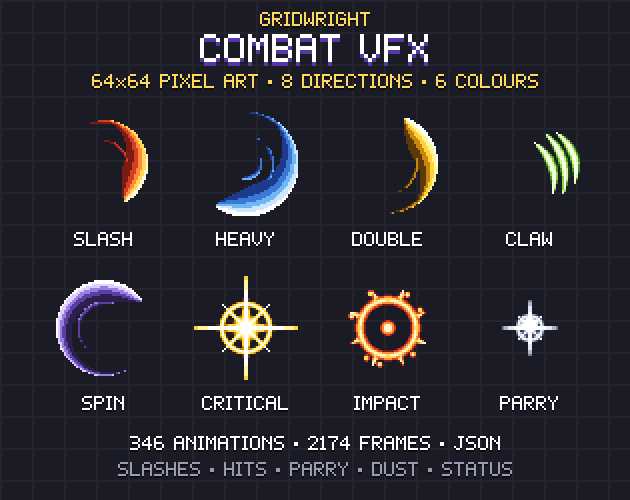
- Land the spark on the hit frame. Combat VFX gives every sheet a JSON with the fps, loop or play-once, the anchor point (the attacker's centre, the hit point or the feet) and the hit frame where damage should land.
- Give each side a colour. Combat VFX comes in steel, fire, frost, shock, venom and arcane, so the player's hits can use one and the boss's attacks another. Its 32x32 stunned loop shows a staggered boss.
- Every boss in Pixel Bosses has its own projectile and impact in both phases, from the Slime King's slime ball to the Watcher Eye's laser bolt.
- Warn before a strike from above. Spell VFX has eight ground areas as 8-frame loops, among them a rune circle, and eight strikes on 64x128 cells, among them a meteor and a lightning bolt. Show the area where the strike will land, then play the strike.
Before wiring an attack, play it in the Sprite Animation Previewer and step through it frame by frame at your fps. A wind-up too short to read shows up there first.
A boss fight checklist
- The arena fits the fight, and the camera is locked to it.
- Every attack has its own pose and a hold.
- Hit boxes are on only during hit frames and sit inside the drawn weapon.
- Phase two has a safe roar, a new palette and a marked point on the bar.
- Sparks land on the hit frame, in the attacker's colour.
Pixel Bosses, Combat VFX, Dark Fantasy UI and Spell VFX are on Gridwright, each bought once with a free sample to try first.
Gridwright packs can be used in commercial games; you may not resell the files themselves. Packs released from October 28, 2026 ask for a credit: “Art by Gridwright” with a link. The four packs here came out before that, so for them a credit is optional. More in can I use game assets in a commercial game.