A CRT filter puts your game behind the glass of an old television: dark lines between the rows of pixels, a fine pattern of red, green and blue dots, a slight curve, a soft glow on bright colours. Used with care, it makes a retro game feel like the era it copies. Pushed too far, it smears small text, darkens the screen and tires the eyes. This guide covers what each part of the effect does to pixel art, where it helps, where it hurts, and how to add one to a game or a trailer without losing the art underneath.
What a CRT filter is made of
Most filters stack the same few layers, and it helps to judge each one on its own before you judge the whole.
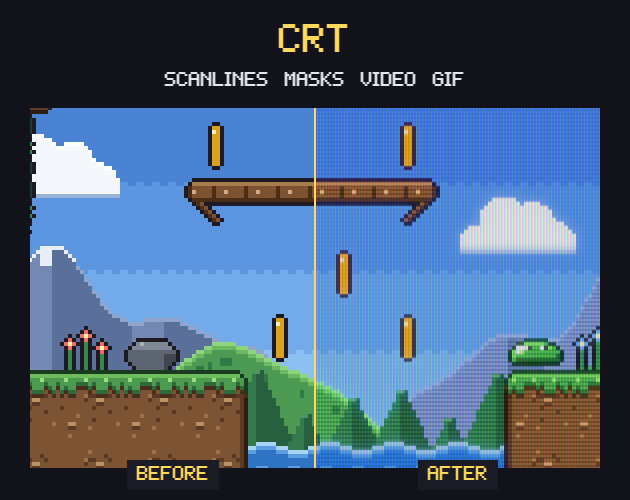
- Scanlines: dark gaps between the rows of pixels. On a real tube the bright rows are drawn thicker than the dark ones, because a brighter beam spreads more.
- A phosphor mask: the tiny pattern of coloured dots or stripes on the glass. An aperture grille gives vertical stripes, a slot mask and a shadow mask give staggered dots, and an LCD grid is the square cell of a handheld screen.
- The signal: clean RGB keeps the art exact, composite adds colour bleed and a faint ghost, and an RF aerial adds noise and jitter.
- The glass: curvature, round corners and darker edges.
- Light: glow around bright pixels, flicker, a rolling bar and afterglow trails behind moving objects.
Each layer has a cost. Scanlines and masks take light away, so the picture gets darker. The signal layers take detail away. The glass bends straight lines near the edges of the screen. A filter with every layer at full strength usually looks like a filter instead of a television, so the craft is in choosing two or three layers and keeping them light.
Where a CRT look helps
The first place is mood. A game whose art follows an 8-bit or 16-bit console gains a lot when its trailer or its title screen looks like that console on a living-room TV, because that is how the players who loved those games remember them.
The second is dithering. Pixel artists of that period often drew checkerboard patterns to fake extra colours, and a composite signal blended those patterns into smooth shades. A light composite blur on dithered art can do the same today, while the same art on a sharp modern screen shows every checker.
The third is marketing material. A screenshot with scanlines and a slight curve stands out in a feed full of flat images, and a short clip of the game on a simulated arcade cabinet tells a viewer what kind of game it is before they read a word. Our CRT Filter is built for this job: open a screenshot, a GIF or a clip, pick one of its seven presets (studio monitor, arcade cabinet, home TV, old TV on an aerial, PC monitor, handheld LCD or scanlines only), tune the scanlines, mask, glow and curve, and save a PNG, a GIF or a video. It can also keep everything outside the screen transparent, which is handy for thumbnails and overlays.
Where it hurts
Small text suffers first. A pixel font with letters five rows tall has very little room, and a dark scanline across every row of a letter costs it contrast. A dialogue box that reads well on a sharp screen can turn grey and soft under a strong filter, so test your smallest text first, at the scale the game really runs.
Uneven scaling comes next. Scanlines only look right with one line per game pixel. If the game is stretched by 2.5 instead of 2 or 3, some pixel rows get a scanline through the middle and others get none, and the screen shows stripes that shift as the camera moves. The CRT Filter finds the real pixel size of an enlarged screenshot by itself so the lines sit on your pixels, but inside a game you set the scale yourself (more on that below).
Then flicker and rolling bars. They look right in a ten-second trailer and wear people out over a long session, and flashing effects can bother players who are sensitive to them. Keep them out of gameplay, or give them their own switch.
The last trap is the small picture. Store pages and social feeds shrink your screenshot, and a fine scanline pattern shrunk down can turn into wavy lines that were never in the image. For thumbnails and capsule art, save a version with lighter scanlines or none.
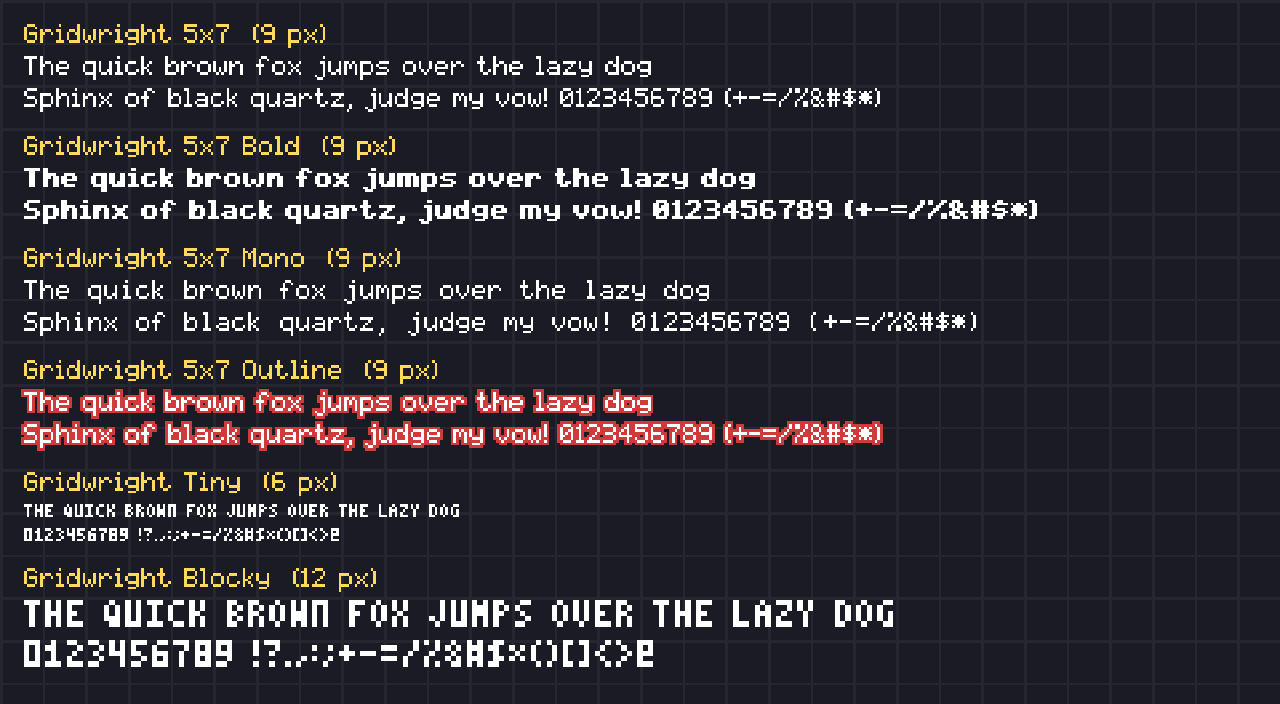
Fonts and UI under a filter
The interface decides whether players keep the filter on. These habits help, and our guide to pixel fonts for games covers the font side in more depth:
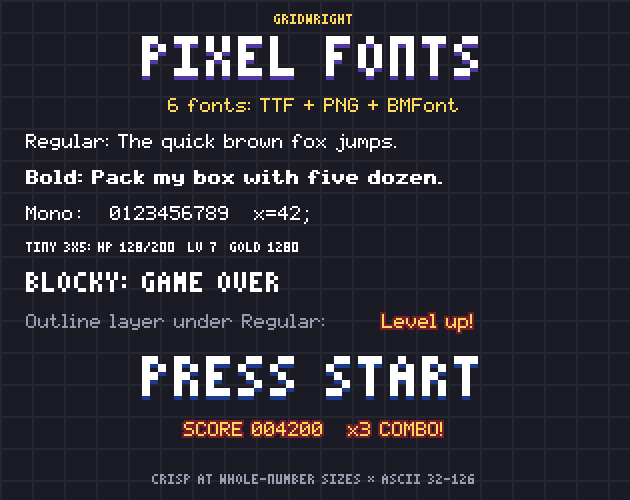
- Use fonts drawn for their native size. In Pixel Fonts, Gridwright 5x7 is a 9 px text font and Gridwright Tiny is a 6 px font of 3x5 capitals for HUD numbers; both stay crisp at their native size and its whole multiples (9, 18 and 27 px for 5x7).
- Give small text an outline. The same pack has a 5x7 Outline font with the same spacing as the regular one: draw it under the text in a dark colour and the letters keep their shape when scanlines cut across them.
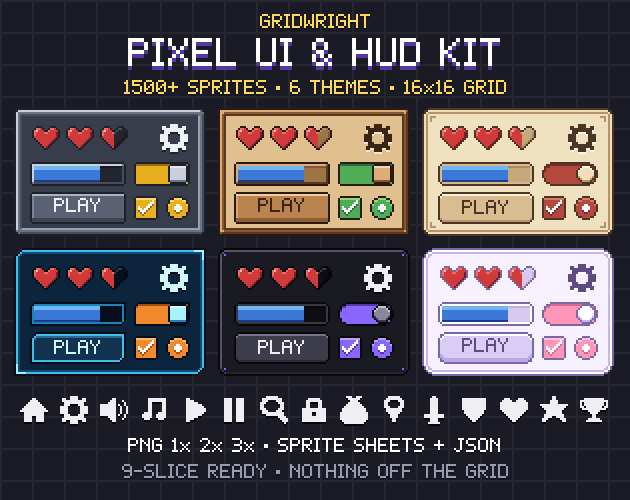
- Keep panel borders thick enough to survive. The Pixel UI Kit is drawn on a strict 16x16 grid with 9-slice panels that stretch with crisp corners, in six themes (stone, wood, parchment, sci-fi, dark and pastel), so you can test which theme still reads behind the glass before you commit to one.
The cleanest fix is to keep the interface out of the filter entirely, and an engine makes that easy to set up.
Adding a CRT filter in Godot 4
Start with the resolution, because a scanline has to match a game pixel. Godot's guide to multiple resolutions says that for pixel art you set the stretch mode to viewport, which renders at the base size and then stretches the result to the window, and that the integer scale mode rounds the scale down to a whole number to prevent uneven pixel scaling. It notes that most pixel art games use viewport sizes between 256×224 and 640×480, and that 640×360 is a good baseline because it scales to 1280×720 and 1920×1080. Our Godot Pixel-Perfect Setup writes those project settings for your game's size.
The filter itself is a shader that reads what has already been drawn. In Godot 4 a canvas_item shader does this with a sampler2D uniform declared with hint_screen_texture (the docs' own example adds repeat_disable and filter_nearest) and reads it at SCREEN_UV, the built-in UV of the current fragment relative to the screen. Put that shader on a rectangle that covers the window, and put the rectangle on its own CanvasLayer between the game world and the HUD. The world goes through the filter, the HUD is drawn after it, and the text stays sharp. If several screen-reading effects overlap, Godot's docs point to the BackBufferCopy node, which copies the screen or a part of it so the later effect sees the earlier one.
Ship it as an option. A setting with Off, Light and Full lets the players who love the look turn it up and the players who came for the game leave it alone. Tune the Light setting with the most care: soft scanlines, no flicker and no curve.
A quick checklist
- One scanline per game pixel: viewport stretch mode and a whole-number scale.
- Read the smallest text with the filter on, at the real game scale.
- Outline small fonts, or draw the HUD above the filter.
- No flicker or rolling bar during play; keep them for trailers.
- A lighter version for thumbnails and store capsules.
- An Off switch in the settings menu.
The CRT Filter, Pixel Fonts and the Pixel UI Kit are on Gridwright, each with its own page that shows it at work. The filter runs in your browser, and your files never leave your computer.
The images and videos you make with the CRT Filter are yours to use anywhere, commercial work too. Gridwright packs can be used in commercial games; you may not resell the files themselves. Packs released from October 28, 2026 ask for a credit: “Art by Gridwright” with a link. Pixel Fonts and the Pixel UI Kit came out before that, so for them a credit is optional. More in can I use game assets in a commercial game.