A pixel art game needs fire, smoke, sparks and magic, and the particle system built into your engine doesn't make them look like pixel art by default. Particles rotate, shrink and fade smoothly, so one flame on a 16x16 character can end up with pixels of several sizes and colours your palette has never seen. There are four ways around that, and most finished games use more than one. This post goes through them and ends with a simple way to decide. Details about other people's tools come from their own pages, read in November 2026.
Option 1: your engine's particles
Godot has two 2D particle nodes, GPUParticles2D and CPUParticles2D. For a burst, turn on One Shot and set Explosiveness to 1 so all particles leave at once. Fixed FPS draws them at a set rate, which gets you the slightly choppy motion that sits well next to hand-animated sprites. A particle can also play a small sprite sheet: add a CanvasItemMaterial, enable Particle Animation and set H Frames and V Frames.
Engine particles have one big advantage: they react to the game. A trail follows the character, a blood splash points away from the hit, and more damage can mean more sparks. They are also free and never look exactly the same twice.
To keep them looking like pixel art, use small textures with no filtering, render the whole game at low resolution so particles land on the same pixel grid as everything else, avoid rotation and smooth scaling, and step colours through a few palette entries instead of a gradient. Even then, a soft fade to transparent will break the look, so swap the texture or cut the alpha in steps.
Option 2: a tool that bakes particles into a sheet
Baking means running a particle simulation, snapping it to pixels, limiting its colours and saving the frames. To your engine the result is a plain animation that costs no more than any sprite. You lose the reactions, and you gain full control of each frame's look.
Our Particle FX Baker runs in the browser. Start from a preset (fire, smoke, magic, sparkles, explosions, rain, snow, dust, hits, heals, coins), change it with sliders and bake it into a sheet with a JSON map. The bake makes the loop seamless, so the last frame runs straight into the first. The free edition has 2 emitters, 15 presets and a canvas up to 64x64, and it saves a PNG sheet. Pro has unlimited emitters, all the presets, a canvas up to 256, our pack palettes, dither, and GIF and Godot export.
Other tools do this well too, and each has its own strength:
- Pixel FX Designer, by CodeManu, has been on Steam for Windows since 2018 and costs under 10 euros. It imports any palette of up to 256 colours, has its own pixelation setting and exports a sprite sheet, single frames or a GIF. It is the most established tool of this group.
- Pixel ability-fx forge, by Devs In Exile, is free, open source and runs in the browser. It is still in development. It generates ability effects from a seed, with 48 formations and 10 elemental palettes, at frame sizes from 128 to 256 pixels, so it suits big spell effects more than tile-sized sparks. It exports a PNG atlas, numbered frames with a recipe file, or a GIF.
- PixelFX Piper is free and runs in the browser, with no sign-up. It stacks effects on a sprite you already have and exports a sprite sheet. Its own site did not open when we checked, so this comes from its Product Hunt page.
Option 3: draw them by hand
A hand-drawn effect can do things a simulation won't: a slash with a clean silhouette, a burst with a strong first frame, a flame shaped to match your art style. It also takes the longest, because every frame is a new drawing and each new colour variant may mean doing some of them again. Keep this for the few effects players watch all game long, such as the main attack, the hit flash and the level-up. Those are the ones that give a game its feel, and they are worth the hours.
Option 4: use a ready pack
A pack makes sense when you need many effects that belong together. Drawing a whole set of elements yourself is where projects stall, and a pack gets them into the game today. It lets you find out early which effects your game really needs.
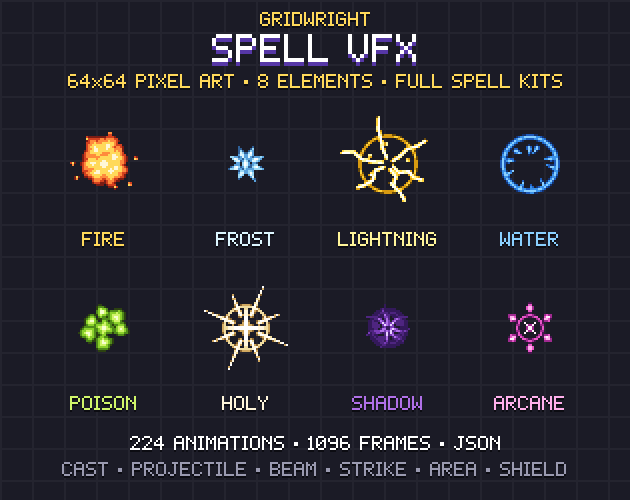
- Spell VFX: 224 animations on 64x64 cells, 1,096 frames in all, in 8 elements. Each element has a cast, projectile, impact, beam, strike, ground area, aura and shield.
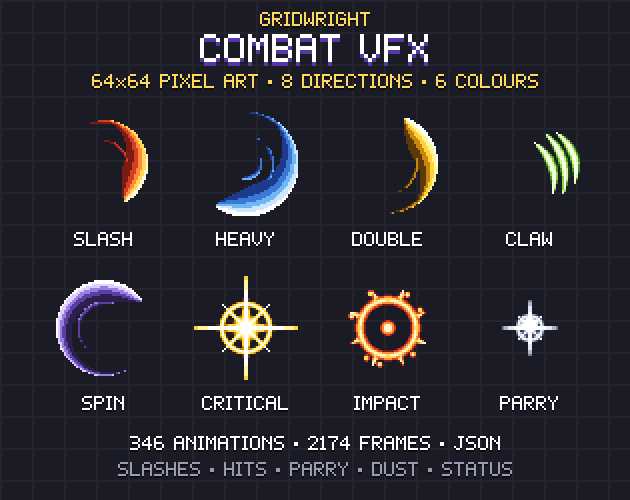
- Combat VFX: 346 effects, 2,174 frames: slashes, thrusts and claws in 8 directions, hits, criticals, parries and status loops.
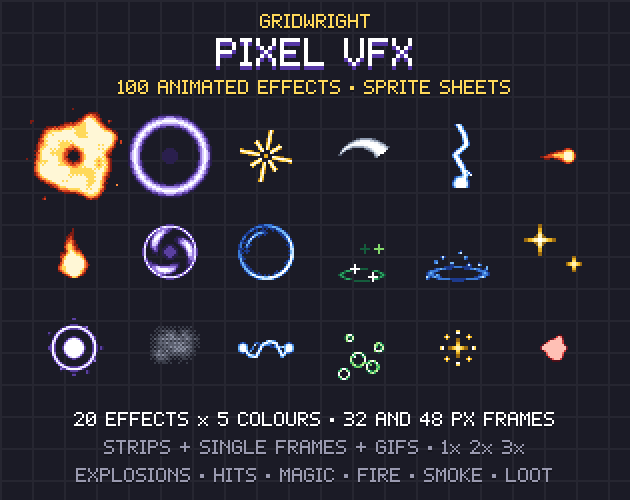
- Pixel VFX: 100 animations, made of 20 effects in 5 colours each, for explosions, hits, magic, fire, smoke and loot.
The risk with any pack is colour: its fire may not use your game's reds. Our free Palette Swapper fixes that in the browser. Drop in the sheet, load your palette and choose closest colour, and every frame comes out in your colours with its transparency untouched.
How to decide
- The effect has to react to the game, such as trails or sparks that scale with damage: use engine particles.
- You need a dozen effects in your exact palette and have an afternoon: bake them.
- Players will look at it thousands of times: draw it by hand.
- You need a whole family of effects now, or you are still prototyping: start from a pack.
- You aren't sure yet: start from a pack, then replace the effects that matter most once the game is fun.
A hybrid that works well
You don't have to pick one. In Godot, a particle can play a baked flipbook, so each particle is a short pixel-perfect animation while the engine handles where and when it spawns. You get reactions from the engine and clean pixels from the bake. It works the other way round too: the Particle FX Baker can use your own small picture as a stamp, up to 64x64, so a sprite from your game can become the particle itself. Both are quick to try with a sheet you already have.
Checks before you ship an effect
- Its pixels are the same size as your sprites' pixels, at every moment of the animation.
- It stays readable against your busiest background, not only on black.
- It starts on its strongest frame if it marks a hit. A slow build-up reads as lag.
- Its colours come from your palette, or sit close enough that nobody notices.
- A looping effect has no visible jump at the seam.
- Many of them at once still keep the game playable and don't hide enemies.
For light that goes with these effects, see our post on 2D lighting for pixel art games.
Gridwright packs can be used in commercial games; you may not resell the files themselves. Packs released from October 28, 2026 ask for a credit: “Art by Gridwright” with a link (each pack’s LICENSE.txt says which applies). More in can I use game assets in a commercial game.