Your hero walks up to a house and their head slides over the roof. Or they step behind a wall and stay drawn on top of it, like a sticker on the screen. Nothing breaks a top-down map faster than walls and roofs that overlap the wrong way. The art can be lovely and the map still looks flat, because the game doesn't know what is in front of what.
This guide covers how tall to draw walls and roofs, how they join, and how to sort them against characters in Godot 4, with examples from three packs on one 16x16 grid: a village, a cliff and a spaceship.
Why top-down walls are a clever cheat
A top-down game shows the top of everything and the front face of anything that faces down the screen. That is the three-quarter look most RPGs use: you see the roof of a house and its front wall, but not its back or its sides. A wall that runs left to right shows its whole face. A wall that runs up and down the screen shows only its top, a thin strip a few pixels wide.
That uneven look is a convention players read without thinking. Our guide to the three-quarter view explains the angle itself; here we build on it.
How tall to draw a wall
The height of the wall's face decides how tall a room feels. Too short, and rooms look like low fences. Too tall, and a south wall covers the furniture behind it.
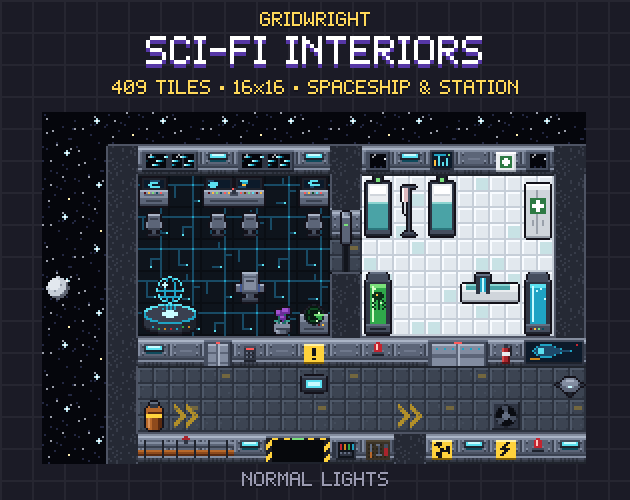
Sci-Fi Interiors draws its walls with a 14 px face on the edges that look down the screen, dark tops and rounded corners, on a 16x16 grid. That face is almost one tile tall, which is about where an interior wall reads as a wall and still leaves room to see a character standing in front of it. The Top-Down Tileset uses the same idea outdoors: its raised plateaus in grass, sand and snow have a wall only on the edges that face down the screen, so a cliff looks like a step up rather than a flat painted line.
- Measure the face against a character: a doorway shorter than your hero makes a room read as a cupboard.
- Keep wall faces only on edges that face down the screen; the other edges show the top strip only.
- Draw the top of the wall darker than the floor, so the eye reads it as the cut edge of something tall.
- Decide the height once and keep it for every wall finish, or two rooms side by side will look like different scales.
Walls that join by themselves
A room has corners, T joins and dead ends. The answer is an autotile: one tile for every combination of neighbours, picked by the engine as you paint.
Sci-Fi Interiors gives you 47-tile wall autotiles in 4 finishes (fleet hull panels, white lab panels, military plating with hazard stripes and a rusted derelict hull), 188 wall tiles in all. The neighbour bitmask is in every wall file name and in tiles.json, so you can wire the walls to any engine. Doors come in a front door, a double door and an airlock for horizontal walls, plus a side door for walls that run up and down the screen. Every door opens in 4 frames and its light turns from red to green.
If you are drawing your own walls, start from a small template and let the Autotile Builder produce the full set, with a seam check, so the corners you never thought to draw are there when the room needs them.
Roofs are built in rows
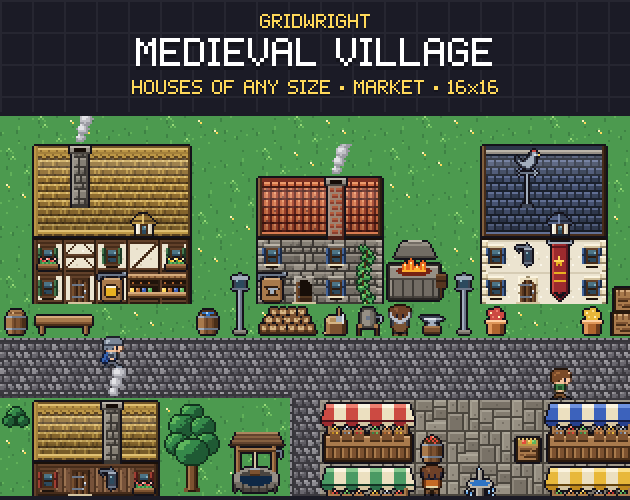
A roof is not one picture per house. If it were, every house would need its own drawing, and a street of ten houses would cost ten paintings. Instead, roofs are built from rows: a ridge on top, slope rows in the middle and an eave at the bottom, each with a left, middle and right piece. A house five tiles wide is a left piece, three middle pieces and a right piece on every row.
Medieval Village works exactly this way. Its pitched roofs come in 4 styles (thatch, clay tile, slate and wood shingle) as ridge, slope and eave rows, every roof also snow-covered, with dormer windows. Under them go facade pieces in timber frame, fieldstone, wooden planks or whitewash: walls, windows, doors, open doors and shop counters. Roofs run left to right, so the gable ends sit at the sides. The pack also holds 18 ready-made buildings, each by day, lit for night and in winter, with their recipes in the JSON.
The number of slope rows is the height of the roof, and the eave overhangs the top of the facade, so the roof sits on the wall instead of floating above it.
Who is in front: the overlap rule
In a top-down game, lower on the screen means closer to the camera. Sorting by the Y position of each object's feet solves most of it: a character south of a tree is drawn in front of it, a character north of it is drawn behind. Walls follow the same rule if you sort them by the bottom of their face, not by the middle of the tile.
Roofs sit above everyone, so they need their own rule. Either put every roof on a layer above all characters and fade it when the player walks inside, or sort each roof with its building, based on the front wall, so a character behind the house disappears under it. The first suits towns you can enter; the second suits buildings you only walk around.
Setting the draw order in Godot 4
In Godot 4 the old TileMap node is deprecated, and a TileMapLayer holds only one layer of tiles. The docs say you can use several TileMapLayer nodes to get the same result, and that is exactly what walls and roofs need.
- A ground layer for floors, grass and paths, with no sorting.
- A walls and props layer with Y Sort Enabled (CanvasItem, Ordering), as a sibling of your characters under a parent that also sorts by Y.
- Per wall tile, a Y Sort Origin set to the bottom of its face. The docs describe it as a vertical offset for sorting that allows using layers as if they were at different heights in top-down games, and it only works when the layer has Y Sort Enabled.
- A roof layer drawn above everything, with a higher Z index. Per tile, the docs say a higher Z index renders a tile in front of others on the same layer.
Collision goes on the wall's base, not its face. Add a physics layer to the TileSet first (the docs say collision, navigation and occlusion all need a layer of their own), then give each wall tile a shape only along its bottom row. In the TileSet editor, F puts in a default rectangle you can trim. With the shape at the base, a character can stand in front of the face and overlap it on screen while the sort keeps them in front.
Fading a roof when the player walks in
Put an Area2D over the floor of each building. When the player's body enters, tween the roof layer's modulate alpha down to 0; when it leaves, tween it back. Players see the room, the furniture and anyone inside, and the street around them stays as it was. Medieval Village has no interiors of its own, but its page lists Gridwright Interiors on the same grid and view, so the inside of a house can be built with matching furniture.
Night and winter without redrawing
Medieval Village has lit night versions of its windows and shop counters and a snow-covered version of every roof, so a night or winter street is a swap of tiles, not a new painting. Sci-Fi Interiors has its lamps in normal and red-alert light, so a ship on alert is a swap too.
Which pack for which wall
For houses, shops and halls, Medieval Village gives you roofs and facades of any size. For rooms, corridors and airlocks, Sci-Fi Interiors gives you joined walls with doors in both directions. For cliffs and raised ground outdoors, the Top-Down Tileset has plateaus in three terrains. All three share one 16x16 grid and one three-quarter view, so a cliff path can lead to a village and a ship can land beside it.
The camera height changes how much wall face you see, so if you haven't picked it yet, read high top-down vs low top-down first, and isometric vs top-down if you are still choosing a view.
Gridwright packs can be used in commercial games; you may not resell the files themselves. Packs released from October 28, 2026 ask for a credit: “Art by Gridwright” with a link (each pack’s LICENSE.txt says which applies). More in can I use game assets in a commercial game.