A map can use one tile size and one palette and still look wrong. The barrel shows its lid as a wide oval while the table beside it shows a thin strip, a house shows its side wall when no other building does, and the hero's shadow falls the other way from the trees. Each piece is fine alone. Together they were drawn from different angles. The three-quarter view, often written 3/4 view, is the most common camera in pixel art RPGs, and it only works when every asset follows the same small set of rules. This guide lays them out.
What the three-quarter view is
The camera sits above the map and tilts toward its north side. The ground is a grid of squares, drawn as if seen from above. Anything that stands up, such as a wall, a tree or a person, shows its top and its front at once. You see the top of a table and the front of the chair, the roof of a house and the door under it, the top of a head and the face.
It isn't a true projection in the mathematical sense. A real camera at that tilt would shorten the floor and lean every wall. The 3/4 view keeps floors square so the grid stays simple, and draws standing things almost at full height so they read well. It is a convention, and like any convention it only holds if nobody breaks it. Our guide to high top-down vs low top-down calls this view high top-down and compares it with the flat overhead camera.

Tops and fronts
Every standing object is split into a top and a front. The front is drawn as if you face it. The top is drawn as if you look down at it, but squashed, because the camera is tilted. How much top you show is the angle of your whole game: a deep top for a camera that looks steeply down, a thin one for a camera closer to the ground.
Pick that amount once and measure it. If a crate one tile wide shows, say, a third of its height as lid, then a chest, a bed and a well show the same share. Round things follow the same rule: the ellipse on top of a barrel or a pot is as flat as a lid on a box of the same depth would be.
Which walls show a face
Only surfaces that face down the screen, toward the camera, show a front. In a room, the back wall at the top of the screen shows its face, often one or two tiles tall above the floor, with a top edge above that. The wall along the bottom of the room faces away, so you see only its top, or it is left out so the player can see inside. The side walls show as thin strips of their top edge.
Cliffs and raised ground follow the same rule. The Top-Down Tileset has 141 cliff tiles: raised plateaus in grass, sand and snow with a wall on the edges that face down the screen. A plateau's north edge is just a rim, and its south edge is a rock face, which is how the eye reads height on a flat grid.
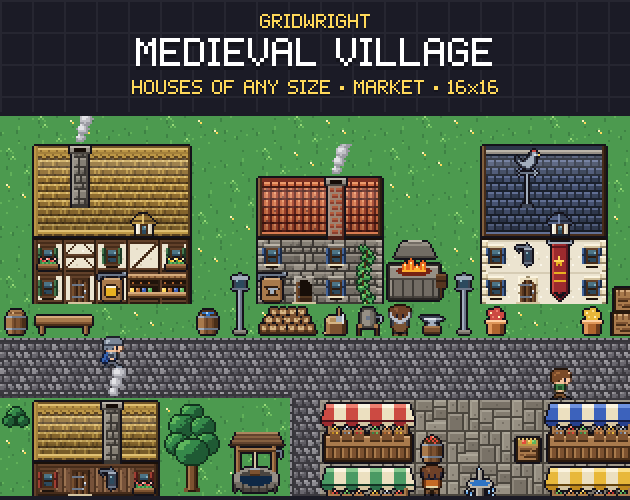
Buildings are a front and a roof. Medieval Village builds houses of any size from rows: a pitched roof as ridge, slope and eave rows with left, middle and right pieces, then a facade of walls, windows and doors below it. Because only the front shows, one kit covers houses of every width, and side walls never have to be drawn.
Characters are taller than their cell
In the 3/4 view a person stands up, so the drawing reaches above the cell their feet occupy. The feet belong to the cell; the head can overlap the tile above. This is the reason three-quarter characters walk behind trees and in front of walls, and why the feet must sit on the same rows in every frame.
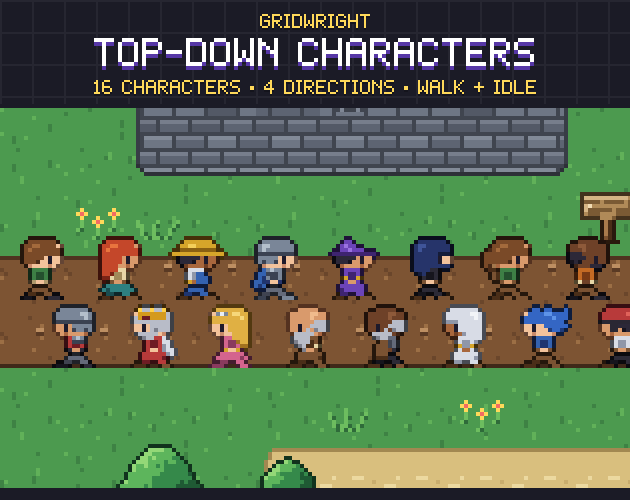
Top-Down Characters keeps its 16 characters on a strict 16x16 grid with the feet on the bottom rows of each cell, in 4 directions with a 2-frame idle and a 4-frame walk. A separate shadow goes under them, so the shadow can match the map's light instead of being baked into every frame.
One light for the whole map
Shading tells the eye where the top ends and the front begins. In most three-quarter art the light comes from the top left: tops are the brightest, fronts a step darker, the right side of round things darker again. Choose a direction and give it to every artist and every pack you use. Shadows fall the same way, or straight down under the object if your lighting is overhead.
Baked shadows are the most common reason bought assets clash. The village kit has no baked shadows, so you can add your own in one direction across the map.
Depth sorting in the 3/4 view
Because things overlap the tile above them, the game has to decide what is drawn in front. The rule is the same in almost every engine: whatever touches the ground lower on the screen is drawn later, in front.
In Godot 4, enable Y-sort on the TileMapLayer that holds walls and trees and on the node that holds your characters. Each tile has a Y Sort Origin, described in Godot's docs as the vertical point of the tile used for determining y-sorted order, so a tall tree sorts from its trunk, not from the top of its canopy. A tile's Texture Origin offsets where it is drawn, which helps when a sprite is taller than its cell. Keep the ground on its own layer so it never sorts above anything.
Larger pieces that stand on their bottom row make this easy. The 57 larger pieces of the village are exact multiples of 16 pixels, such as the 32x48 trees and the 48x64 windmill, and they stand on their bottom row, so the base is always the sorting point.
A checklist for matching assets
- Lids and tops: place a crate, a barrel and a table side by side. The tops should look like the same camera angle.
- Faces: no building, cliff or piece of furniture should show an east or west face that the others don't.
- Light: the bright side, the dark side and the shadow direction match on every piece.
- Feet: a character's feet sit on the bottom rows of the cell in every frame and every direction.
- Scale: a character in a doorway and next to a table. A door roughly one character tall, a table about waist height.
- Outlines: the same outline rule everywhere, either dark outlines on everything or on nothing.
Where the three-quarter view stops
The 3/4 view shows height only toward the camera. Stairs going north, several floors and towers that matter in play are hard to show, because the north side of everything is hidden. If height is the game, an isometric camera does it better; isometric vs top-down pixel art compares the two, and isometric vs dimetric pixel art explains the 2:1 grid that isometric pixel art uses.
For towns, farms, dungeons and character-driven RPGs, the three-quarter view is hard to beat: faces read, buildings have personality, and the art stays cheaper than isometric because a wall or a tree is drawn once. The three packs used here share one 16x16 grid and one three-quarter view, so a street with terrain, houses and people looks like one artist drew it. The Top-Down Tileset's ground comes as 47-tile autotile sets, and for a terrain of your own the Autotile Builder turns one small template into a full 47-tile set.
Gridwright packs can be used in commercial games; you may not resell the files themselves. Packs released from October 28, 2026 ask for a credit: “Art by Gridwright” with a link (each pack’s LICENSE.txt says which applies). More in can I use game assets in a commercial game.