A tactics map without height plays like chess on a picture. The archer on the hill shoots no further than the one in the field, the unit on a cliff is drawn behind the ground it stands on, and a click on the clifftop selects the tile hidden underneath it. Elevation is what turns an isometric grid into a battlefield, and it touches the art, the draw order, the input and the rules at once.
This guide walks through height levels on a 2:1 isometric grid, how to sort and pick tiles that stand on top of each other, how units path up and down, and simple attack range rules that reward high ground.
What height gives a tactics game
- Range: ranged units see and shoot further from above.
- Defence: attacking uphill can cost accuracy or damage.
- Movement: climbing costs more, and some steps are too tall to climb at all.
- Choke points: ramps, stairs and ladders become the places a fight is decided.
None of this needs complicated code. It needs one number per cell, the height, and art that shows that number clearly.
Height levels on a 2:1 grid
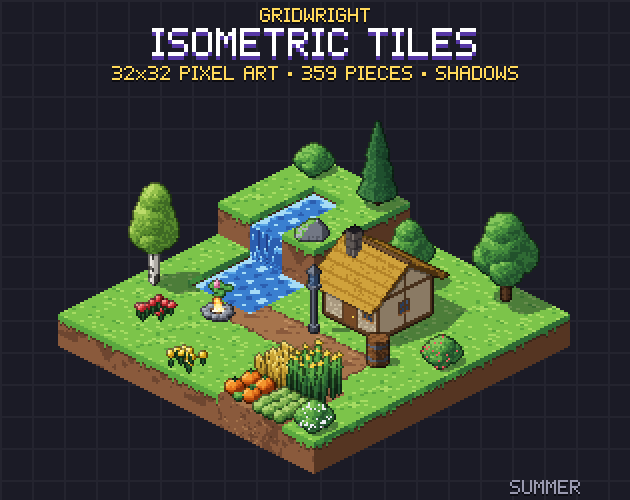
Isometric Tiles is built on a 32x16 ground diamond with blocks 16 px tall, so a block sprite is 32x32 and every file is a multiple of 16 px. One level of height is one block: 16 px straight up on screen. Stacking blocks makes hills, cliffs and walls, and a half block makes a step between levels.
Slopes matter as much as cliffs, because they are where units can climb. The pack has ramps in 6 materials up towards all 4 corners, each in a lower and an upper half so the slope shows from every side, and stone and wooden stairs in 4 directions. Its isometric.json lists every sprite's footprint, anchor and height, plus the ramp directions, so your map code can read which cells connect.
On screen, with a 32x16 diamond, the cell at column c and row r sits at x = (c - r) * 16 and y = (c + r) * 8, and each level lifts it 16 px. Keep the cell, the level and the drawn position as three separate things in your code. The rules use the cell and the level; only the drawing uses the lifted position.
Storing height in Godot 4
There are two clean ways. One is a height map: an array or dictionary with one level per cell, and one TileMapLayer for the ground that you draw block columns on. The other is one TileMapLayer per level, each moved up 16 px more than the one below. Godot's docs say a TileMapLayer holds only one layer of tiles and that you can use several of them to get the result of the old TileMap node, so a layer per level is the intended pattern.
Sort by depth first (row plus column), then by height, and draw a unit with the cell it stands on. A raised layer is drawn higher on screen, which would make Y-sorting put its tiles too far back. Godot's TileMapLayer has a Y Sort Origin that is added to each tile's own value, and per tile the docs describe Y Sort Origin as the vertical point used for the sorted order, so a raised layer can be given back the sort of its ground row.
Clicking the right tile
On a map with height, the tile under the mouse on screen is not always the cell the player means. A clifftop is drawn over the ground cells behind it, so a plain screen-to-cell conversion selects the hidden tile.
Test from the top down. With one TileMapLayer per level, call local_to_map with layer.to_local(mouse position) on the highest layer first (the docs: it returns the map coordinates of the cell containing the given local position) and check whether that cell has a tile with get_used_cells or get_cell_tile_data. The first level that answers is the one the player clicked. Each layer's own offset is already in its local coordinates, so the lift needs no extra maths.
Paths that climb
Godot's AStarGrid2D has two diamond cell shapes for an isometric look, CELL_SHAPE_ISOMETRIC_RIGHT and CELL_SHAPE_ISOMETRIC_DOWN, so it can work in your map's own coordinates. set_point_solid turns a cell into an obstacle, and set_point_weight_scale multiplies the cost of moving into a cell, which is a simple way to make high cells or mud slower. Call update() before setting them: the docs say it clears every point's solidity and weight.
The catch is that AStarGrid2D stores data per cell, not per step between cells. A rule such as one level up per step but never two depends on the pair of cells, so it can't be written as a weight. For that, use AStar2D and connect only the neighbours whose height difference is allowed, with ramps and stairs connecting the levels they join. Most tactics games also keep paths to the four grid directions; AStarGrid2D's DIAGONAL_MODE_NEVER does exactly that.
Attack range that rewards high ground
Grid tactics usually measure range in steps along the grid: the difference in columns plus the difference in rows. Height then adjusts it. These rules are easy to read on screen and easy to balance:
- Ranged units gain 1 range for every level they stand above the target, and lose none below it.
- Melee only reaches a target within one level of the attacker.
- A cell two or more levels higher than both attacker and target, on the line between them, blocks the shot.
- Range highlights are drawn on top of each cell's own height, so a highlighted clifftop sits on the cliff, not on the ground behind it.
Show the rule while the player aims. A number on the target's tile, or highlights that spread further from a hill, teaches the high-ground bonus faster than any tutorial.
Units that stand on top of blocks
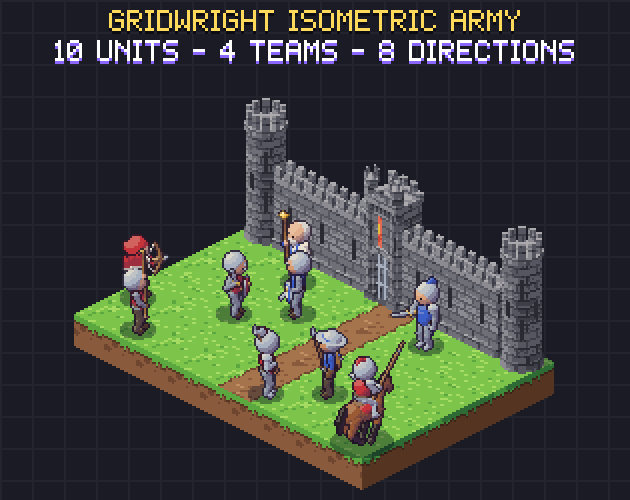
Isometric Army has 10 animated units in 4 team colours and 8 directions, every direction drawn and none mirrored: a worker, a swordsman, a spearman, an archer, a crossbowman, a halberdier, a standard bearer, a priest who casts a heal, a captain and a mounted knight. Infantry cells are 64x64 with the anchor at (32, 46) and the knight's 80x80 at (40, 60), both the centre of a ground diamond, so a unit on a raised block is the same anchor lifted 16 px per level.
Its JSON per character has hit frames and hit boxes per direction, spawn points for arrows and bolts, and the ground speed per direction, so the feet don't slide when a unit walks down a ramp. Every unit also has idle, walk, run, hurt and death.
Castles are high ground you can build
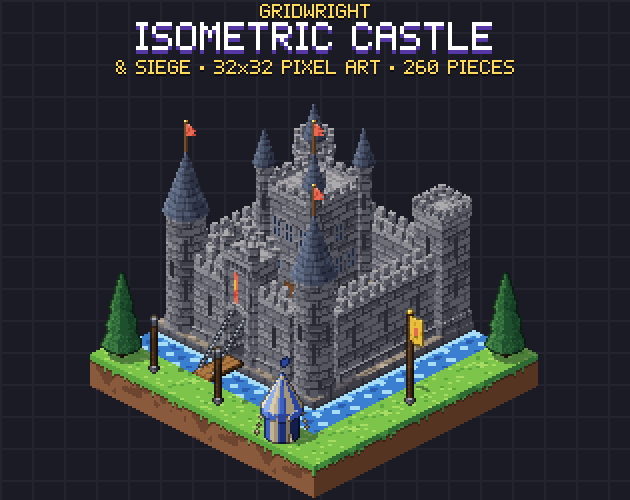
Walls make the best elevation fights. In Isometric Castle & Siege the curtain walls are 32 px tall, two levels on the same grid, with a flagstone wall walk and battlements, and they join by themselves with 16 pieces per finish. Towers stand on a wall cell, gatehouses have a portcullis that rises over 4 frames, and the ways up are ashlar stairs in 4 directions, siege ladders that lean on a wall and a siege tower. Archers on the wall walk get the range bonus; the attackers have to fight for the ladders.
Lay out the battlefield before you code it
The Isometric Builder runs in the browser with every Gridwright isometric pack loaded, stacks pieces by their real heights and exports a Godot scene or a Tiled map. Build one battle map there, then check the heights with your rules: where are the ramps, how many levels does the wall give the defenders, and can every unit reach the fight?
A quick checklist
- One level equals one block height, the same on every piece.
- Cell, level and drawn position kept apart in code.
- Sort by depth, then height; pick tiles from the top level down.
- Climbing rules on the step between cells, not on the cell.
- Range bonus shown on screen while the player aims.
If you are still choosing a camera, read isometric vs top-down pixel art and high top-down vs low top-down. Vehicles on a grid bring their own direction and size questions, covered in top-down car sprites.
You can ship Gridwright art in a commercial game; reselling the files themselves isn't allowed. Since October 28, 2026 new packs ask for a credit, “Art by Gridwright” with a link, and each pack's LICENSE.txt tells you whether yours does. See can I use game assets in a commercial game.