Many 2D games stall in the same place: the prototype works, then the art list turns out twice as long as planned because the camera asks for things nobody counted. A side view game needs jump, fall and landing frames, platform edges and a parallax sky. A top-down game needs four directions of every walk, terrain that blends, and walls that hide the right things. The camera decides gravity, controls, level design and the size of the art budget. This guide goes through what changes, so you can choose before you build.
The two cameras
In a side view the camera looks at the world from the side, like a stage. The ground is a line, the player moves left and right, and gravity pulls down the screen. Platformers, metroidvanias, run-and-guns, side-view brawlers and many puzzle games use it.
In a top-down view the camera looks down at the ground, either almost straight down or tilted so you see the fronts of walls and people, the three-quarter view. The player moves in any direction across the map, and there is usually no gravity in play at all. RPGs, farming and life sims, roguelikes, twin-stick shooters and survivors-likes use it.
Gravity and movement in the engine
The camera changes what your character controller is. Godot 4's CharacterBody2D has a motion mode for each case. Grounded mode applies when walls, ceiling and floor are relevant, and Godot's docs call it suitable for sided games like platformers. Floating mode applies when there is no notion of floor or ceiling, and the docs call it suitable for top-down games.
A grounded body uses its up direction to decide what is a floor and what is a wall, is_on_floor() tells you if it touched the floor in the last move, and a floor snap length keeps it attached to slopes. That is the whole feel of a platformer: coyote time, jump buffers and landings all hang on those checks. A floating body just moves in the direction of the input. Top-down movement is simpler to code, and side view movement is where much of the tuning time goes.
Character animations
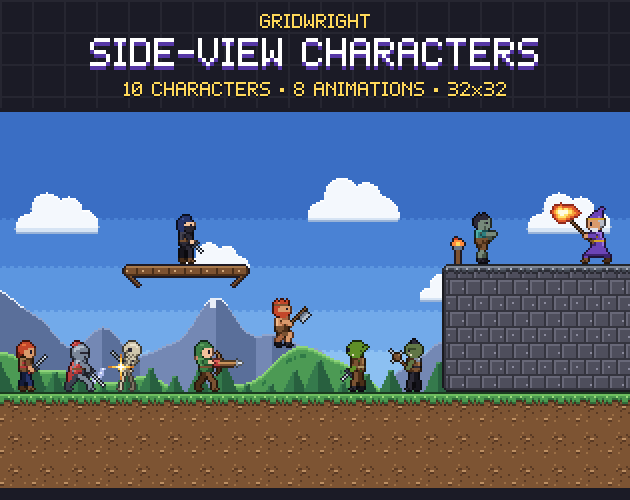
Side view characters face two ways, right and left, but they need more kinds of motion. Side-View Characters gives each of its 10 characters idle, walk, run, jump, fall, attack, hurt and death, 34 frames per facing and 68 in all, with the feet on the bottom rows and the same bottom-centre pivot in every frame so nothing slides when an animation changes. Its JSON also marks the attack's hit frame and hitbox.
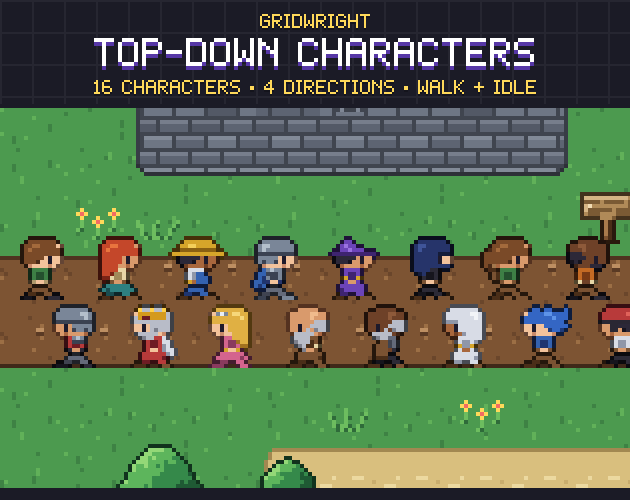
Top-down characters need fewer kinds of motion but more directions. Top-Down Characters has 16 characters, each with down, left, right and up, a 2-frame idle and a 4-frame walk: 24 frames per character. That is enough for a town full of people. Add attacks, tools or eight directions and the count grows by direction, because each one is its own drawing.
So the costs fall differently. A side view hero is expensive and a side view crowd is rare; a top-down crowd is cheap per person, and a top-down action hero gets expensive once every move needs four or eight directions. Count the frames for your own move list before you pick the camera.
Tiles and level art
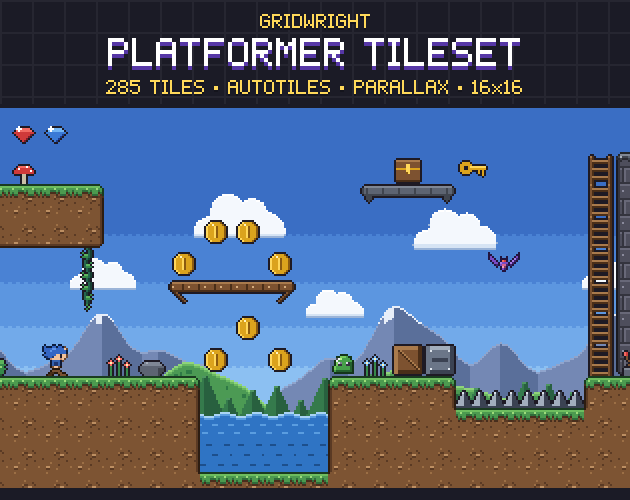
A side view tileset is about edges you stand on. Every terrain needs a cap on top, edges on the sides and corners, plus platforms, ladders, spikes and hazards. The Platformer Tileset has 47-tile autotile sets in grass, stone, snow and sand with caps on top and edges on the sides, 26 pieces of platforms, ladders, vines, chains and spikes, and water and lava with animated surfaces.
A top-down tileset is about terrain meeting terrain. Grass runs into sand, paths cross meadows, water has shores, and raised ground shows a cliff face on its south edge. Most of the work is in transitions, which is what autotile sets solve, and in props that stand up out of the grid. Side view needs fewer transitions but more care at every edge a player can land on.
Backgrounds
A side view game shows the sky, so it needs backgrounds, usually in layers that scroll at different speeds to fake depth. The Platformer Tileset's parallax layers (sky, clouds, mountains, hills and forest) are 256x144 and seamless, in day and dusk. A top-down game shows only the ground; its backdrop is the map itself, and the budget goes into more terrain and props instead.
Level design and collisions
Side view levels are read left to right and top to bottom. Height is the main design tool: jumps, drops, ledges and vertical shafts. Collision shapes are close to the body, because what touches the floor is the whole character.
Top-down levels are read like maps. Routes, rooms and open spaces matter more than height, and collision usually covers only the feet, so a character can walk behind a tree or up to a wall while its head overlaps it. How much of an object's front you show changes that, which high top-down vs low top-down explains, and the next guide in this series takes the three-quarter view apart rule by rule.
Can a game use both?
Yes, and some classic RPGs do: a top-down overworld with side view battles, or side view towns with a top-down map between them. It doubles the character art, so plan it from the start. The easiest way to keep one character recognisable in both is to draw both views on the same body proportions.
That is what Sprite Bases is for: 4 blank, already animated bodies (Slim, Broad, Tall and Chibi) in top-down 16x16 and 32x32 in 8 directions and in side view facing right and left, with the same 8 animations in every view. You draw your costume once per frame on bodies that already agree.
A quick way to choose
- Jumping, precise platforming or vertical exploration is the core: side view.
- Towns, farming, many characters or an open map to wander: top-down.
- Aiming in any direction, or enemies coming from all sides: top-down.
- A small team with one hero and a few enemy types: side view keeps the character count low.
- A small team with many NPCs: top-down, because each one needs only a few frames.
- Height that matters in play (towers, cliffs, several floors) on a grid: neither, look at isometric. Isometric vs top-down pixel art compares them.
Try both before you commit
The cheapest test is one screen in each view with real assets at your target resolution. The packs used here are made for exactly that: Side-View Characters stand on the Platformer Tileset in their battle screenshot, and Top-Down Characters share their 16x16 grid and style with the Top-Down Tileset. Each has a free sample, so both mockups cost an afternoon, not a week of drawing.
Gridwright packs can be used in commercial games; you may not resell the files themselves. Packs released from October 28, 2026 ask for a credit: “Art by Gridwright” with a link (each pack’s LICENSE.txt says which applies). More in can I use game assets in a commercial game.